Passport Photo Size: All-Country Guide + Visa & ID Photo Sizes (2026)
TL;DR: The Short Answer
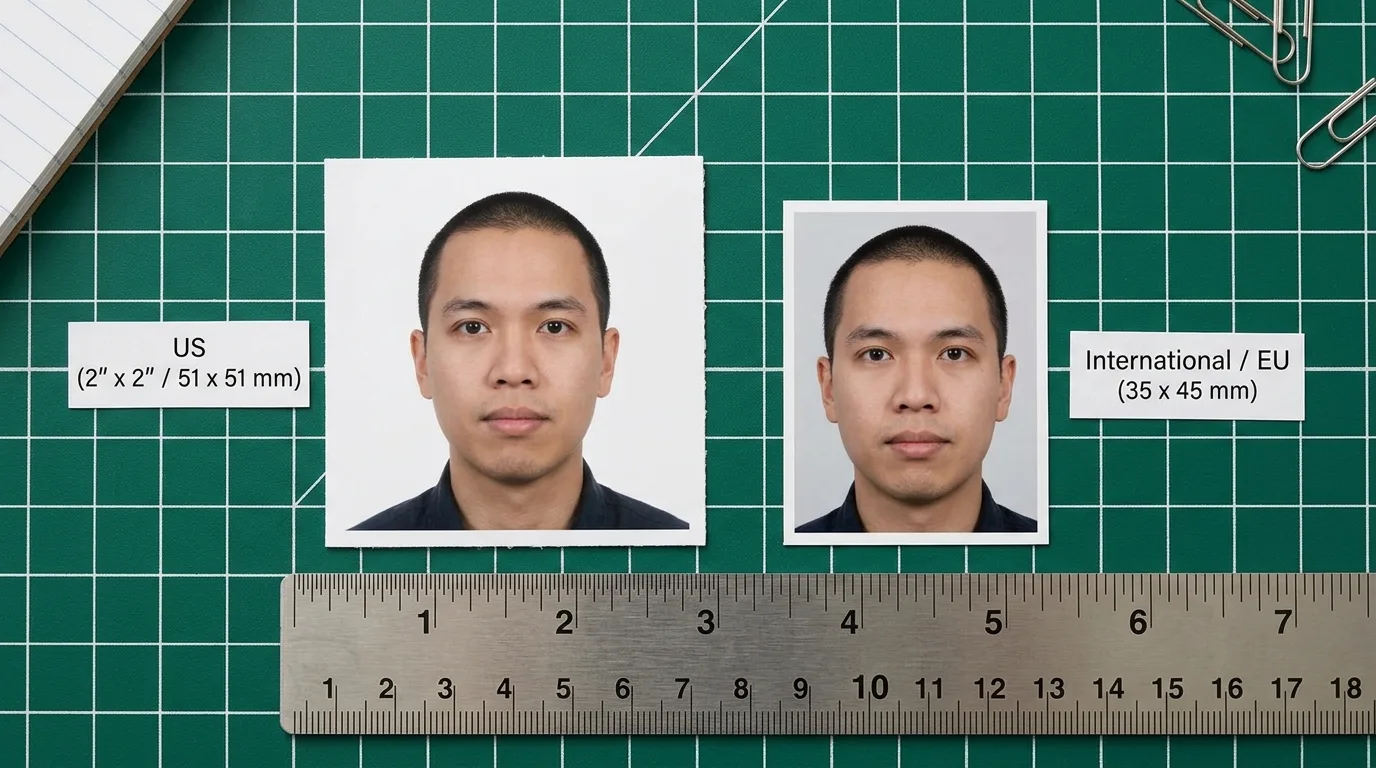
Passport photo size depends on the country. The most common format is 35×45mm, which many countries use, including the UK, EU/Schengen countries, Japan, and Australia. However, the United States and India use a square 2×2-inch (51×51mm) format. Canada uses 50×70mm, while China uses 33×48mm.
Digital requirements also vary. For example, US DS-160 photos must meet specific pixel and file-size limits, while other countries use different requirements. Always check the official requirements for your specific passport or visa before printing or uploading a photo.
In 2026, photo editing rules also matter. For US applications, avoid AI-generated backgrounds, beauty filters, and digital changes to your face. Instead, take a fresh photo against a real plain background.
The All-Country Passport Photo Size Table (2026)
| Country | Size (mm) | Size (inches) | Pixels @ 300 DPI | Head height | Background | Glasses |
|---|---|---|---|---|---|---|
| United States | 51×51 | 2×2 | 600×600 | 25–35mm (50–69%) | White / off-white | Not allowed |
| United Kingdom | 35×45 | 1.38×1.77 | 413×531 | 29–34mm | Light grey / cream | Allowed if worn daily |
| Schengen / EU (27) | 35×45 | 1.38×1.77 | 413×531 | 32–36mm (70–80%) | Light grey / white | Not allowed |
| Canada | 50×70 | 1.97×2.76 | 591×827 | 31–36mm | White | Not allowed |
| Australia | 35×45 | 1.38×1.77 | 413×531 | 32–36mm | White / pale | Not allowed |
| Japan | 35×45 | 1.38×1.77 | 413×531 | 28–34mm | White | Allowed if daily |
| China | 33×48 | 1.30×1.89 | 390×567 | ~70–80% | Pure white | Not allowed; both ears visible |
| India | 51×51 | 2×2 | 600×600 | 25–35mm | White | Not allowed |
| Philippines | 51×51 | 2×2 | 600×600 | 30–35mm | White | Allowed if daily |
| Bangladesh | 45×55 | 1.77×2.17 | 531×650 | 29–34mm | White (grey for babies) | Not allowed |
| Thailand | 35×45 | 1.38×1.77 | 413×531 | 25–35mm | White | Not allowed |
| Russia | 35×45 | 1.38×1.77 | 413×531 | 30–34mm | Light grey | Not allowed |
| Brazil | 50×70? (varies) | — | — | ~70% | White | Allowed if daily |
Note on India: Indian passports and e-Visas use the US-style 51×51mm square, but some Indian consular posts accept 35×45mm. Check the specific embassy’s requirements before printing. Brazil’s requirements vary by document type — confirm with the consulate.
The Four Size Families (Memorize These)
Every country’s passport photo falls into one of four families. If you remember these, you can guess correctly for any country not in the table:
- ICAO standard (35×45mm): UK, all EU/Schengen countries, Japan, Australia, Russia, Thailand, and most of the world. Head fills 70–80% of the frame. This is the global default.
- US square (51×51mm / 2×2″): United States, Philippines, India (passport and e-Visa), and countries that follow the US model. Head fills 50–69% of the frame — noticeably smaller than the ICAO standard.
- Canada large (50×70mm): Only Canada. The largest standard passport photo. If you print a 35×45mm photo for Canada, Canadian authorities will reject it.
- China small (33×48mm): Only China. Slightly narrower and taller than ICAO. Both ears must be visible — a rule unique to China.
Visa Photo Sizes (Often Different From Passport)
Visa photos sometimes differ from the same country’s passport photo. The most common visa specs:
| Visa | Size | Digital file cap | Notes |
|---|---|---|---|
| US visa (DS-160 / DV lottery) | 51×51mm (2×2″) | JPEG, 600×600–1200×1200px, ≤240KB | Must upload digital with application |
| US passport (online renewal) | 51×51mm | JPEG/PNG/HEIC, 54KB–10MB | Wider tolerance than DS-160 |
| Schengen visa | 35×45mm | N/A (printed) | Same as passport; head 32–36mm |
| UK visa | 35×45mm | JPEG, ≤5MB, min 600×750px | Digital upload for many visa types |
| China visa | 33×48mm | 354×472px, 40–120KB | Strict file-size window |
| India e-Visa | 51×51mm | JPEG, ≤1MB | US-style square |
| Australia visa | 35×45mm | JPEG/PNG, ≤5MB | Digital upload |
The DS-160 240KB cap catches more applicants than any other rule. A phone photo is usually 2–5MB; you must compress it down to under 240KB without dropping below 600×600 pixels. Export at JPEG quality 50–60 at 600×600 and check the file size.
The January 2026 Rule: AI Backgrounds Are Rejected
The biggest change to passport photo rules in years took effect in January 2026: the US State Department now explicitly rejects any photo with an AI-generated or AI-replaced background, and any photo altered by beauty filters, skin smoothing, or generative editing. The photo must show you photographed against a real white or off-white surface — a wall, a sheet, a backdrop. Using an app to remove and replace the background, even if the result looks perfectly white, is now grounds for automatic rejection and can delay your application by weeks.
This means the old trick — take a photo anywhere, run it through a background-remover app, get a clean white background — no longer works for US passports and visas. It also means beauty filters, face-tuning, and skin smoothing apps are forbidden. If you normally wear glasses and the app removes them digitally, that is also considered an alteration. If you need to remove glare from glasses you are permitted to wear (UK, Japan, Philippines), do it with careful lighting — not digital editing. A guide to removing glasses glare covers lighting and minimal retouching, but for passport photos the safest path is to take glasses off entirely.
Universal Rules (Every Country, Every Application)
Nearly every country agrees on these. Break one and your photo will be rejected:
- Taken within the last 6 months. Your appearance must match current look.
- No selfies. Someone else must take the photo, or use a tripod and self-timer. A selfie arm angle distorts proportions.
- No filters, no retouching. No beauty apps, no skin smoothing, no face-tuning. 2026 rules explicitly ban AI alteration.
- Neutral expression. Eyes open, mouth closed, no teeth showing. A natural closed-mouth smile is allowed in the US; most other countries require fully neutral.
- Face centered, looking directly at camera. Shoulders square, head straight (no tilt).
- Even lighting, no shadows. No shadows on the face or background. Use two light sources or a large window.
- Plain background. No patterns, no textures, no other people or objects. Stand at least 1 meter (3 feet) from the wall to avoid casting a shadow on it.
- Headwear only for religious reasons. No hats, no headbands, no hair covering the forehead or eyes.
- No uniforms or camouflage clothing. Plain everyday clothing.
If your wall is not perfectly white and you need to adjust it minimally, a guide to changing color of an object covers subtle color correction — but keep it minimal, and never replace the background entirely.
How to Take a Passport Photo at Home (That Won’t Get Rejected)
You do not need a studio. Follow this setup:
- Background: A plain white or off-white wall. If the wall is textured, hang a white sheet stretched flat. Stand 1–1.5 meters from the wall to avoid shadows.
- Lighting: A large window to one side, plus a white wall or reflector on the other side to fill shadows. Or two lamps at 45° angles, eye level. No on-camera flash — it causes harsh shadows and red-eye.
- Camera: Phone or camera on a tripod, at eye level, 1.5–2 meters away. Zoom in slightly (2× optical) to avoid wide-angle lens distortion. Do not use the front camera — it distorts faces.
- Framing: Head centered, top of head to chin fills the required percentage (50–69% for US, 70–80% for ICAO). Shoulders and upper chest visible.
- Take multiple shots. Blink, posture, expression — take 10 and pick the best. Check focus on the eyes at 100% zoom.
- Print or upload. For print: 300 DPI, exact size, matte or glossy photo paper. For digital: check file size against the cap. If scanning an existing printed photo, a guide to photo scanning apps covers getting a clean digital copy — but note that a scanned printed photo may be rejected for US applications; shoot fresh if possible.
For studios and volume work, a guide to photo editing cost covers what professional retouching costs — though for passport photos, the rule is “no retouching at all.”
5 Common Passport Photo Mistakes
- Wrong size for the country. 35×45mm for a US application, or 2×2″ for a Schengen visa, gets rejected on sight. Check the table.
- AI-replaced background (2026 ban). US applications now auto-reject digitally replaced backgrounds. Shoot against a real white wall.
- File too large for DS-160. Over 240KB and the upload fails. Compress to JPEG quality 50–60 at 600×600.
- Glasses on for US/China/Schengen. Banned unless medically required (with signed note). Take them off.
- Shadow on background or face. Standing too close to the wall, or single-side lighting. Move back 1m and use fill light.
Frequently Asked Questions
What is the standard passport photo size?
There is no single global standard. The most common is 35×45mm (ICAO standard, used by UK, EU, Japan, Australia). The US uses 2×2 inches (51×51mm) square. Canada uses 50×70mm. China uses 33×48mm. Check the table for your specific country.
What size is a US passport photo?
2×2 inches (51×51mm), exactly square. Head must measure 1 to 1⅜ inches (25–35mm) from chin to crown — 50–69% of the image height. Background plain white or off-white. No glasses. For digital upload: 600×600 to 1200×1200 pixels, JPEG.
What size is a UK or Schengen passport photo?
35×45mm (3.5×4.5cm), portrait orientation. Head height 29–34mm (UK) or 32–36mm (Schengen). Background light grey or cream (UK) or light grey/white (Schengen). At 300 DPI this is 413×531 pixels.
Can I use a 35×45mm photo for a US passport?
No. The US requires exactly 2×2 inches (51×51mm) square. A 35×45mm portrait will be rejected. Conversely, a US 2×2″ square will be rejected for UK/Schengen applications. Print the correct size for each.
What is the file size limit for US visa (DS-160) photos?
Maximum 240KB, minimum 10KB, JPEG format, 600×600 to 1200×1200 pixels, square. This is stricter than the US passport online renewal limit (54KB–10MB). Compress carefully — too small and it is blurry; too large and the upload fails.
Can I wear glasses in my passport photo?
For the US, China, and Schengen countries: no, unless medically required with a signed doctor’s note. For the UK, Japan, and Philippines: glasses are allowed if you wear them daily, but there must be no glare and frames must not cover the eyes. When in doubt, take them off — it is the safest choice.
Are AI-edited or filter-altered passport photos allowed?
No. As of January 2026, the US State Department explicitly rejects AI-generated or AI-replaced backgrounds, beauty filters, skin smoothing, and any digital alteration of facial features. The photo must be an unaltered shot against a real plain background. Other countries are adopting similar rules.
How recent must a passport photo be?
Taken within the last 6 months, and must reflect your current appearance. If you have changed your hair color, grown a beard, had major facial surgery, or changed weight significantly, take a new photo. If you look noticeably different, the photo will be rejected even if it is technically within 6 months.
Final Verdict
Passport photo rejection is almost always preventable — it comes down to using the exact size for your country, meeting the head-height percentage, and following the no-alteration rules. Print or upload the right dimensions (2×2″ for US, 35×45mm for UK/EU/Japan/Australia, 50×70mm for Canada, 33×48mm for China), shoot against a real plain background with even lighting, take glasses off, and for digital uploads check the file-size cap twice — especially the US DS-160’s strict 240KB limit. And in 2026, skip the AI background remover entirely. Do that, and your photo sails through on the first try.