Social Media Image Sizes Cheat Sheet 2026: Every Platform, Every Pixel
TL;DR: The Short Answer
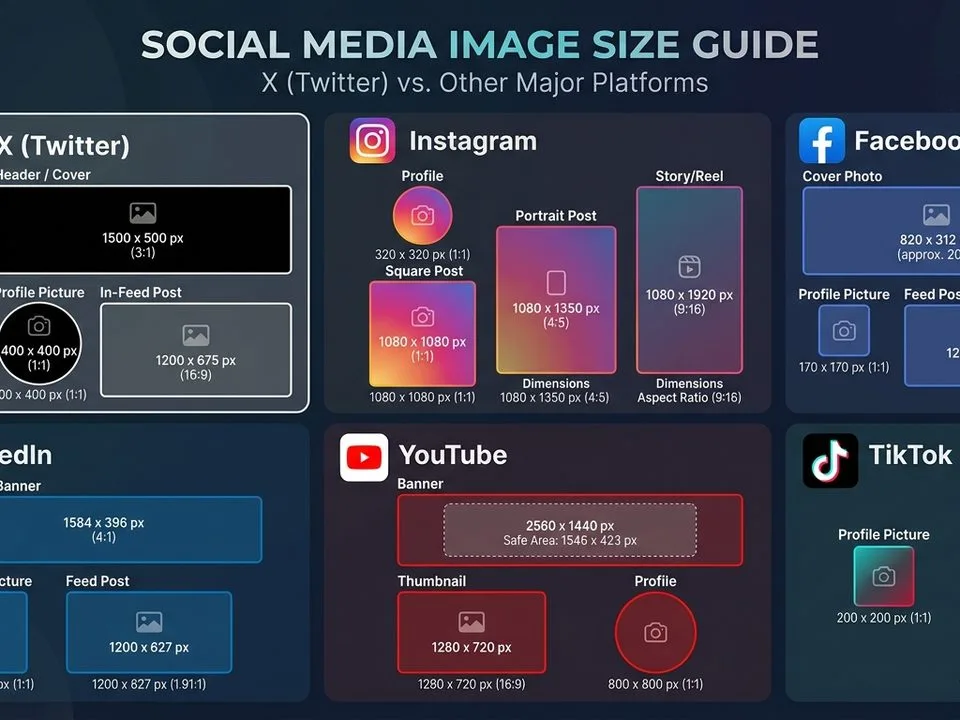
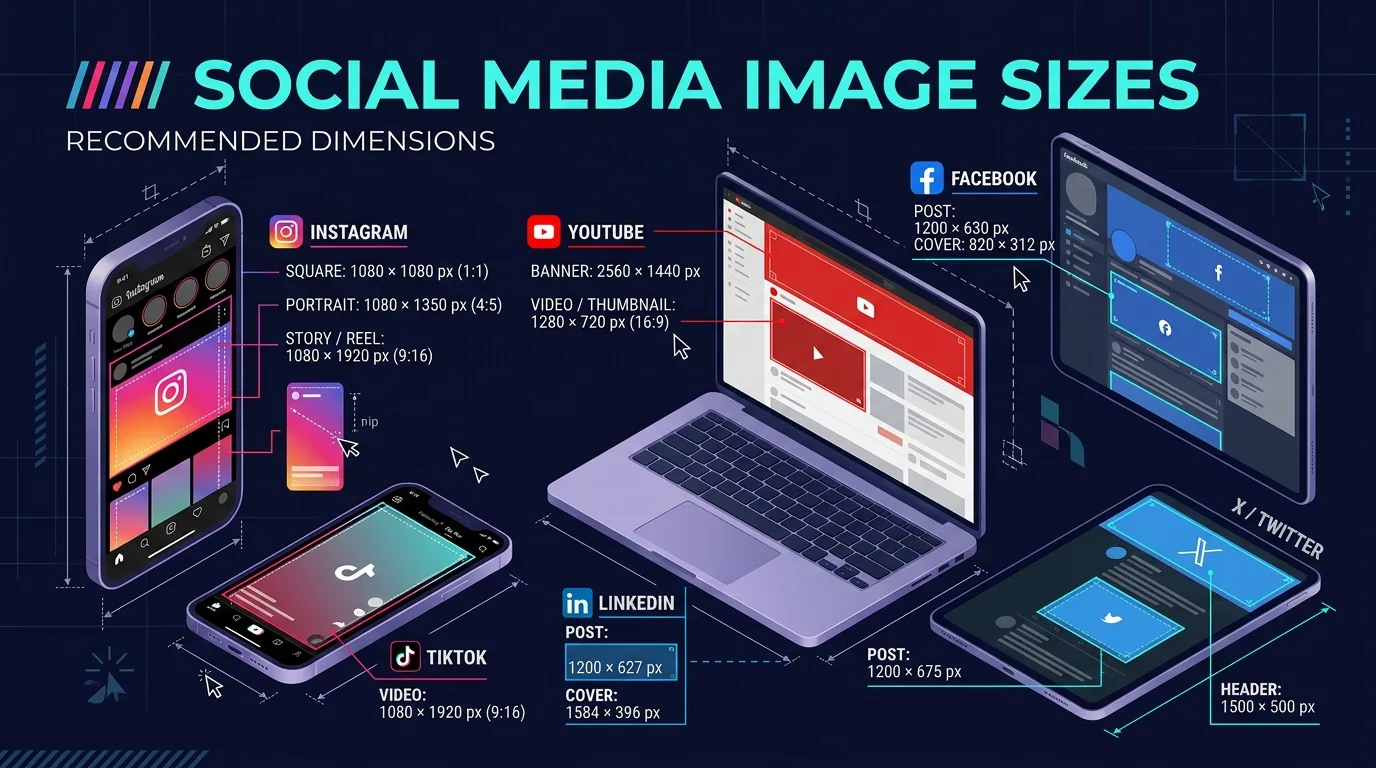
If you remember nothing else: export every social media image at 1080px wide minimum, sRGB color space, JPEG quality 80–85, and never upload larger than the platform’s display resolution — every platform re-compresses oversized uploads, which is what makes photos look soft. The three universal formats that cover 90% of posts: square 1080×1080 (works everywhere), portrait 1080×1350 (4:5) (Instagram/Facebook/LinkedIn feed, maximum space), and vertical 1080×1920 (9:16) (Stories, Reels, TikTok, WhatsApp Status, YouTube Shorts). Platform-specific quirks that get posts rejected or cropped: X header is 1500×500 (3:1, crops top/bottom ~60px), LinkedIn personal banner is 1584×396 (4:1) but company cover is 1128×191 (5.9:1 — very short), Pinterest pins are 1000×1500 (2:3 vertical — the only platform that rewards tall images), and YouTube thumbnails are 1280×720 under 2MB. The master table below has every pixel.
The Master Social Media Image Size Table (2026)
| Platform | Profile photo | Cover / Banner | Feed post | Stories / Vertical | Link / card | Max file |
|---|---|---|---|---|---|---|
| 320×320 | — | 1080×1350 (4:5) | 1080×1920 | — | ~30MB | |
| 180×180 (upload 320) | 820×312 desk / 640×360 mob | 1080×1350 (4:5) | 1080×1920 | 1200×630 | ~30MB | |
| X (Twitter) | 400×400 (≤2MB) | 1500×500 (3:1) | 1600×900 (16:9) / 1080×1350 | — | 1200×628 | 5MB/image |
| 400×400 (upload 800) | 1584×396 personal / 1128×191 company | 1200×627 (1.91:1) / 1200×1200 | — | 1200×627 | 8–10MB | |
| 165×165 | 800×450 (upload 1600×900) | 1000×1500 (2:3) | — | — | 20MB | |
| TikTok | 200×200 (min) | — | — | 1080×1920 | — | 5MB image |
| YouTube | 800×800 | 2560×1440 (safe 1546×423) | — | 1080×1920 Shorts | Thumbnail 1280×720 ≤2MB | 2MB thumb |
| 500×500 | — | — | 1080×1920 Status | — | ~16MB | |
| Threads | 400×400 | — | 1080×1350 / 1080×1080 | 1080×1920 | — | — |
Platform-by-Platform Quirks (The Things That Get You Cropped)
Instagram: Feed posts accept 1.91:1 to 4:5, but 4:5 (1080×1350) fills the most space. The 2025–2026 profile grid crops thumbnails to 3:4 — keep faces/text centered. Reel covers crop to 4:5 in the grid.
Facebook: Cover photo is the #1 mistake — desktop shows 820×312, mobile crops to 640×360, and your profile photo overlaps the bottom-left. Keep everything in the central 640×312 safe zone. Carousels must be uniform 1:1 on every card.
X (Twitter): Header/banner is 1500×500 but ~60px gets cropped from top and bottom on some screens — keep text in the central 1500×380 band. In-stream images display at 16:9 (1600×900) uncropped; portrait 4:5 also works but takes more space. Link previews use 1200×628 (1.91:1). Max 5MB per image — X rejects larger files.
LinkedIn: Two different cover sizes trip everyone up — personal profile banner is 1584×396 (4:1), company page cover is 1128×191 (5.9:1, very short). Feed posts display best at 1200×627 (1.91:1) or square 1200×1200. Portrait 4:5 works for carousels. Article covers use 1200×644. For designing these graphics, a guide to graphic design software covers tools that ship with social-size templates.
Pinterest: The only platform that rewards tall images. Pins at 1000×1500 (2:3) get the most real estate in search and feeds. Square pins work but display smaller. Board covers are 600×600 square. For video pins, 1080×1920.
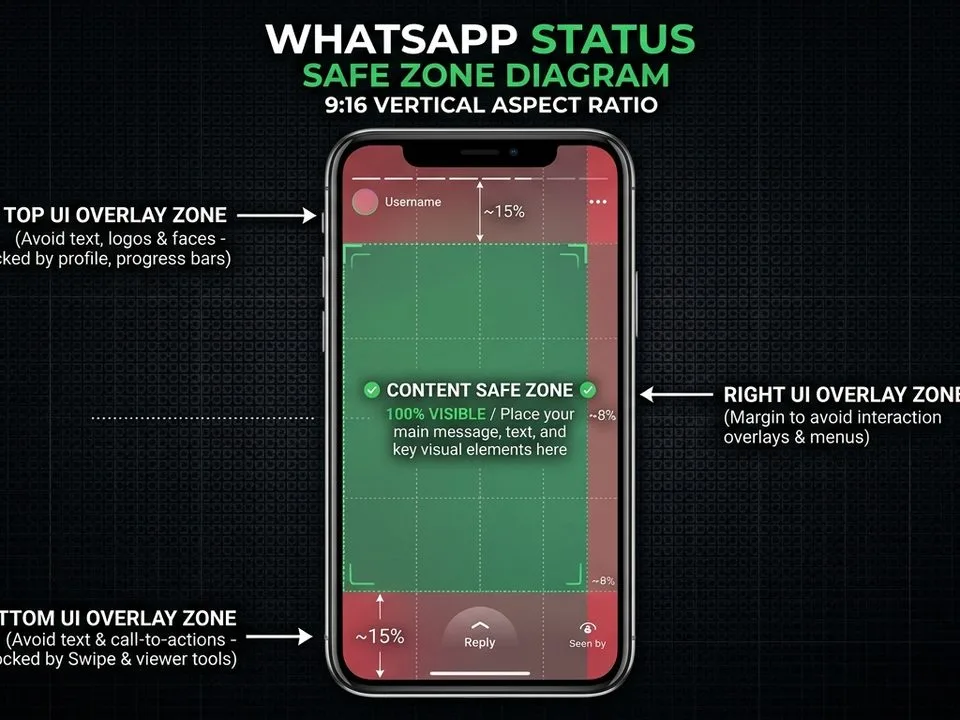
TikTok / WhatsApp Status / YouTube Shorts / Instagram Reels / Facebook Reels: All share 1080×1920 (9:16). One vertical video works everywhere. Keep text out of the bottom 20% (captions, buttons) and right 10% (like/comment icons). For editing vertical video, a guide to video editing tips covers the workflow.
The One-Size-Fits-Most Cross-Posting Formula
You do not need 9 different exports. Use this 3-file system and you cover every platform:
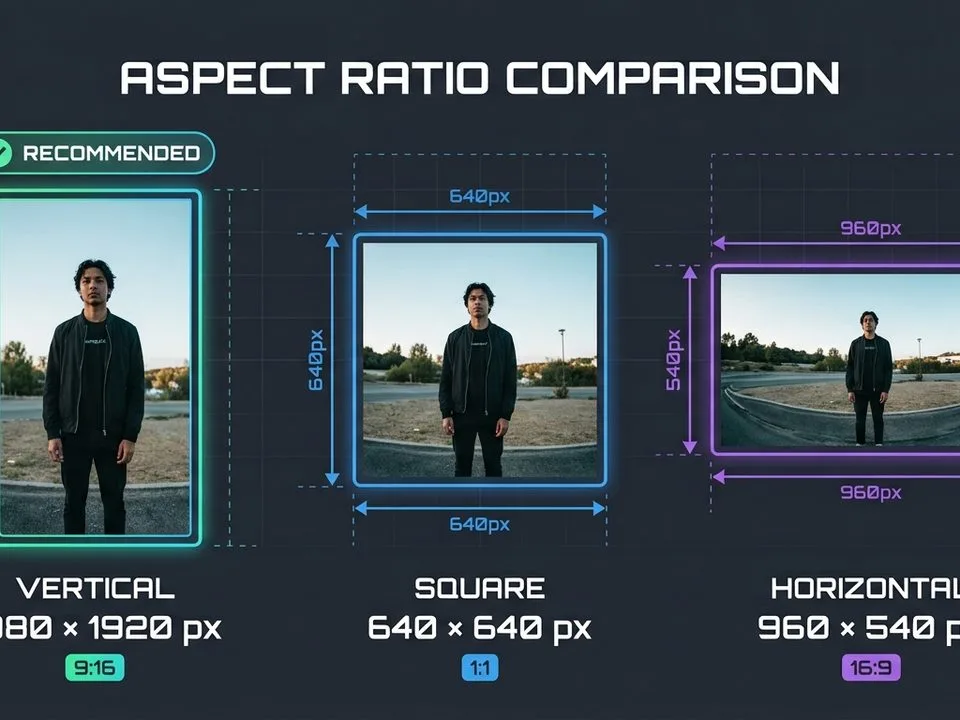
- Square 1080×1080 — works on Instagram feed, Facebook feed, X, LinkedIn, Threads. Never cropped anywhere.
- Portrait 1080×1350 (4:5) — maximum space on Instagram/Facebook/LinkedIn feeds. Cropped slightly in X timeline (displays 16:9 center).
- Vertical 1080×1920 (9:16) — Stories, Reels, TikTok, WhatsApp Status, YouTube Shorts. One file for all vertical platforms.
Export all three from the same master image. Keep the subject (face, product) centered so no crop cuts it off. For portrait photos destined for social, a guide to frequency separation covers skin retouching that survives heavy platform compression.
Universal Export Settings (Apply to Every Platform)
Every platform compresses uploads. To minimize quality loss:
- Exact pixel dimensions — never upload larger than the table says. Oversized = downscaled + re-compressed = soft.
- sRGB color space — Adobe RGB/ProPhoto uploads look dull. Every social platform assumes sRGB.
- JPEG quality 80–85 — below 75 = visible artifacts; above 85 = bigger file, no gain. Use PNG only for flat graphics/text.
- Light sharpen after resize — Unsharp Mask 50–80%, 0.5px. Compression softens edges; this compensates.
- Check file-size caps — X 5MB, YouTube thumbnail 2MB, LinkedIn 8–10MB, Pinterest 20MB. Exceed and the upload fails silently.
- No WebP/HEIC/AVIF — most platforms reject them. Convert to JPG first.
For creative composite images (collages, before/after), a guide to photo manipulation covers techniques that work for social graphics.
Cover Photo Safe Zones (The Cropping Trap)
Covers and banners are where 90% of sizing mistakes happen. Every platform crops differently on mobile vs desktop:
- Facebook cover: desktop 820×312, mobile 640×360. Safe zone: central 640×312. Profile photo overlaps bottom-left.
- X header: 1500×500. ~60px cropped top/bottom on some screens. Safe zone: central 1500×380.
- LinkedIn personal banner: 1584×396. Profile photo overlaps bottom-left on desktop. Safe zone: right 70% of the image.
- YouTube banner: 2560×1440 upload. Safe zone (visible on all devices): central 1546×423. Everything outside is cropped on TV/mobile.
- Pinterest profile cover: 800×450, upload 1600×900. No tricky crop.
Rule: design text and logos in the center 60% of any cover. The edges are decoration only.
5 Common Social Media Sizing Mistakes
- Uploading 4K/2048px photos. Triggers re-compression. Export at exact display resolution.
- Using one cover size for LinkedIn personal + company. 1584×396 vs 1128×191 — very different. Company cover text gets cropped if you use the personal size.
- Square pins on Pinterest. Displays tiny. Use 1000×1500 (2:3) vertical.
- Text in cover-photo edges. Cropped on mobile. Keep everything in the central safe zone.
- Exceeding X’s 5MB / YouTube’s 2MB cap. Upload fails silently. Compress first.
Frequently Asked Questions
What is the best universal image size for social media?
Square 1080×1080 works on every platform without cropping. For maximum feed space on Instagram/Facebook/LinkedIn, use 1080×1350 (4:5 portrait). For Stories/Reels/TikTok, use 1080×1920 (9:16). Export these three from one master image.
What DPI should I use for social media images?
DPI is irrelevant for screens — only pixel dimensions matter. Use 72 or 96 DPI (it changes nothing on display) and focus on exact pixel sizes and sRGB color space. For print, 300 DPI matters; for social, it does not.
What size is a Pinterest pin in 2026?
1000×1500 pixels (2:3 aspect ratio). Pinterest is the only major platform that rewards tall vertical images — they occupy more space in search and feeds. Square pins (1000×1000) display smaller. Board covers are 600×600 square.
What size is an X (Twitter) header photo?
1500×500 pixels (3:1 aspect ratio). About 60px may be cropped from the top and bottom on some screens, so keep text and logos in the central 1500×380 band. Profile photos are 400×400, max 2MB. In-stream images display best at 1600×900 (16:9).
What is the LinkedIn banner size?
Personal profile banner: 1584×396 pixels (4:1). Company page cover: 1128×191 pixels (5.9:1 — very short). They are different sizes — do not use the same file for both. Feed post images: 1200×627 (1.91:1) or 1200×1200 square.
Why do my social media photos look blurry?
Almost always because you uploaded at the wrong size and the platform re-compressed. Export at exact pixel dimensions (1080px wide for most feeds), sRGB color space, JPEG quality 80–85. Add a light sharpen after resizing. Never upload WebP or HEIC — convert to JPG first.
What is the maximum file size for social media images?
X: 5MB per image. YouTube thumbnail: 2MB. LinkedIn: 8MB (profile) / 10MB (post). Pinterest: 20MB. Instagram/Facebook: ~30MB (but you should never need that much — a 1080px JPEG at quality 85 is 300–600KB).
What size is a YouTube thumbnail?
1280×720 pixels (16:9), maximum 2MB file size, JPG or PNG (not WebP). Keep text and faces in the central area — the bottom-right is covered by the duration timestamp. YouTube channel banner: 2560×1440 upload, with all-visible safe zone of 1546×423 centered.
Final Verdict
Social media sizing in 2026 is three numbers and one rule: 1080×1080 square, 1080×1350 portrait, 1080×1920 vertical, and export at exact pixel dimensions in sRGB JPEG 85. Everything else is platform-specific cover-photo safe zones and file-size caps — X’s 5MB, YouTube’s 2MB, LinkedIn’s two different banner sizes, Pinterest’s 2:3 pins. Save the master table, build the three-file export system, and you will never upload a blurry or cropped social image again.