Pinterest Image Sizes 2026: Pin, Multi-Page, Video, Product & Board Dimensions
TL;DR: The Short Answer
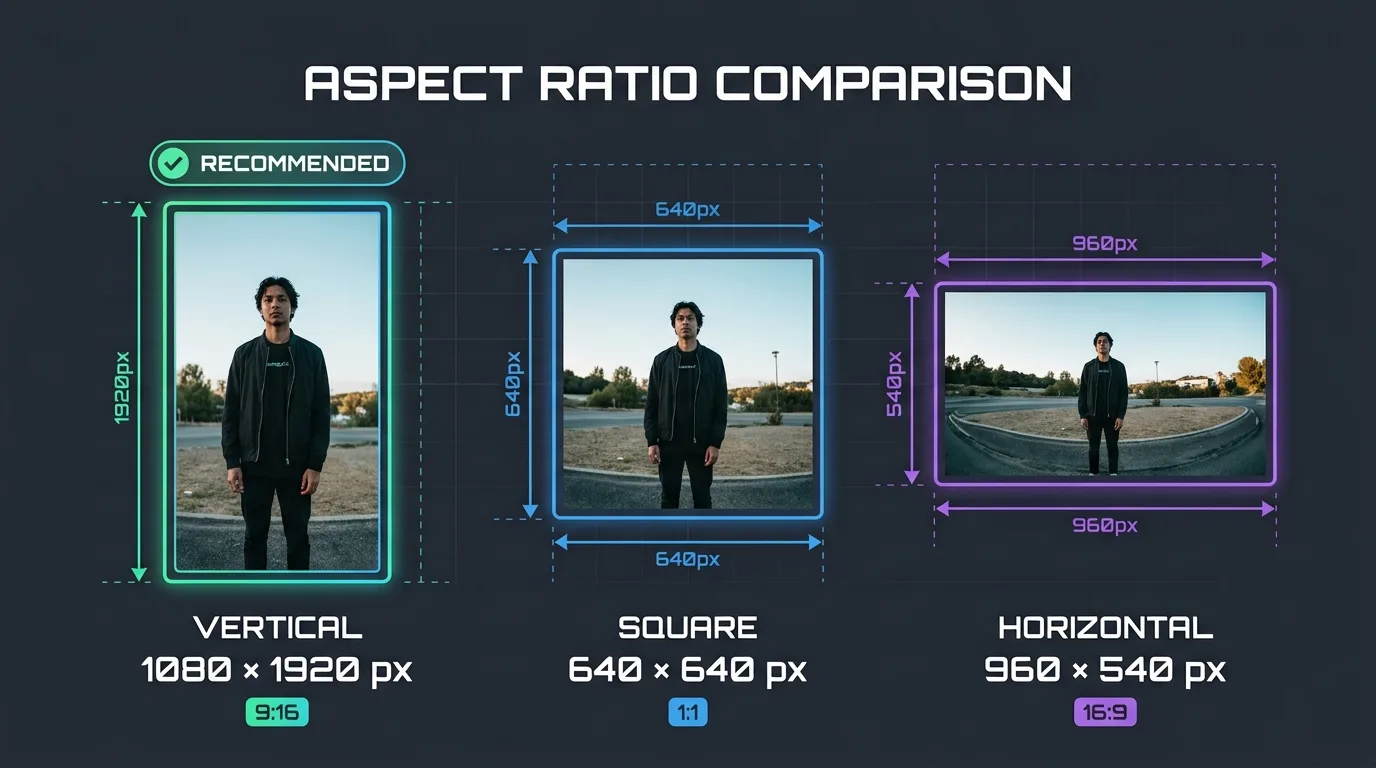
Pinterest is the only major social platform built around vertical images — and size directly determines how much feed space you get. The standard pin is 1000×1500 pixels (2:3 vertical), and that format gets up to 60% more saves than square or horizontal pins; square pins (1000×1000) underperform by roughly 40–50%. Tall pins/infographics go up to 1000×2100 (1:2.1) — anything taller gets truncated in the feed, so 1:2.1 is the practical maximum for full display. Multi-page Pins (formerly Idea Pins, merged in 2023–2025) use 1080×1920 (9:16), up to 20 pages, and now support outbound links. Video pins use 1000×1500 (2:3) or 1080×1920 (9:16), MP4/MOV, 4 seconds to 15 minutes (optimal 6–15 seconds), max 2GB — and they autoplay muted, so subtitles are mandatory.
Profile photo: 165×165 display (upload 600×600+, circle-cropped). Profile cover: 800×450 (16:9). Board covers: 600×600 square (cropped to thumbnail). File caps: 20MB per image (aim for 300–500KB), 2GB video. Formats: JPG, PNG, WebP. Minimum width 600px; treat 1000px as the practical floor.
The Master Pinterest Size Table (2026)
| Format | Size (px) | Aspect ratio | Max file | Notes |
|---|---|---|---|---|
| Standard Pin | 1000×1500 | 2:3 | 20MB (aim 300–500KB) | Recommended default; best saves |
| Square Pin | 1000×1000 | 1:1 | 20MB | 40–50% less engagement than vertical |
| Long / infographic Pin | up to 1000×2100 | 1:2.1 max | 20MB | Taller gets truncated in feed |
| Multi-page Pin (ex-Idea Pin) | 1080×1920 | 9:16 | 20MB/image | Up to 20 pages; outbound links now allowed |
| Video Pin | 1000×1500 or 1080×1920 | 2:3 or 9:16 | 2GB | 4s–15min; optimal 6–15s; muted autoplay |
| Carousel Pin | 1000×1500 or 1000×1000 | 2:3 or 1:1 | 20MB/card | Swipeable multi-image |
| Product / Shop Pin | 1000×1500 | 2:3 | 20MB | Price/availability auto-pulled from feed |
| Profile photo | 165×165 display (upload 600×600+) | 1:1 | 10MB | Circle-cropped |
| Profile cover | 800×450 | 16:9 | 20–32MB | Banner at top of profile |
| Board cover | 600×600 | 1:1 | 20MB | Cropped to 222×150 thumbnail |
| Image ad | 1000×1500 | 2:3 | 20MB desktop / 32MB in-app | Standard promoted pin |
Why Vertical 2:3 Wins (The Algorithm Prefers It)
Pinterest’s feed is a masonry grid of fixed-width columns. A taller image occupies more vertical pixels in that column, which means it takes up more of the viewer’s screen, stops the scroll longer, and gets more saves and clicks. This is a structural advantage, not a preference: 2:3 (1000×1500) is the tallest ratio that displays fully without truncation. Square pins (1:1) occupy roughly 40–50% less vertical space, which is why they consistently underperform. Horizontal Pins (16:9) perform worst because Pinterest displays them at a tiny size and rarely recommends them.
The ceiling is 1:2.1 (1000×2100). Pinterest cuts off taller Pins and adds an “expand” prompt in the feed, reducing their immediate visual impact. For infographics and step-by-step tutorials, 1:2.1 is the sweet spot — tall enough to dominate the feed, short enough to display fully. Some sources cite a technical range up to 1:3.5, but Pinterest truncates anything beyond 1:2.1 in practice.
For product pins (jewelry, fashion, home decor), lifestyle context outperforms plain white-background shots on Pinterest’s visual search — users are looking for inspiration, not catalog shots. A guide to jewelry photo editing and a guide to clipping path use cases cover isolating products so you can place them on styled backgrounds. A guide to shadow creation adds the realism that makes product pins look like inspiration rather than ads. For fashion pins, a guide to ghost mannequin vs flat lay compares the three styles that perform best on Pinterest.
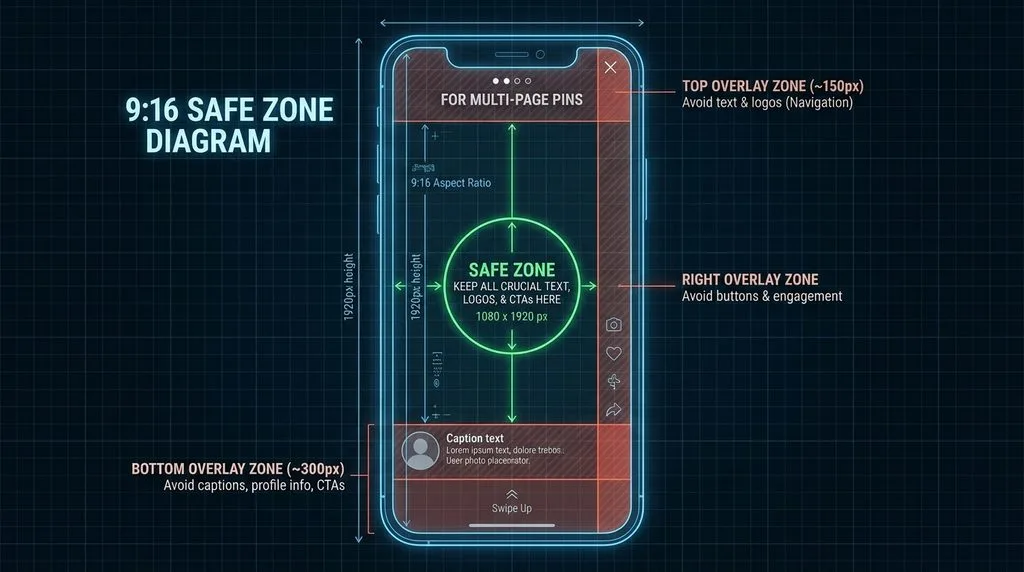
Multi-Page Pins (Idea Pins Are Gone — Here’s What Replaced Them)
Pinterest phased out the “Idea Pin” / “Story Pin” branding between 2023 and 2025 and merged the format into the unified Pin creator. What you need to know:
- Size: 1080×1920 (9:16), full-screen vertical. Same dimensions as Instagram Reels / TikTok.
- Up to 20 pages per pin, mixing images and short video clips.
- Image pages: 20MB max each, JPG/PNG/WebP. Video clips: up to 60 seconds each, 100MB per clip (web) / 2GB (mobile app).
- Outbound links are now allowed — this was the big change. Old Idea Pins had no clickable links; multi-page Pins do.
- Text must be large and high-contrast. These pins display full-screen on mobile, so small text is unreadable. Use bold, minimal typography — busy backgrounds and tiny text hurt saves.
Video Pins: Muted Autoplay Means Subtitles
Video pins are growing on Pinterest, but the rules differ from TikTok/Reels:
- Size: 1000×1500 (2:3) or 1080×1920 (9:16). Square (1:1) also accepted but gets less space.
- Format: MP4, MOV, or M4V, H.264. Max 2GB. Minimum 240p; optimal 720p or 1080p. Bitrate 4–6 Mbps.
- Duration: 4 seconds minimum, 15 minutes maximum. Optimal: 6–15 seconds. Hook in the first 2–3 seconds.
- Autoplay starts videos with the sound off. Always add burned-in subtitles or text overlays. Most viewers never unmute.
- First frame is the cover in the feed — make it a strong, text-overlaid still that works as a standard pin.
Profile, Cover & Board Covers (The Often-Wrong Ones)
- Profile photo: displays at 165×165, circle-cropped. Upload at 600×600 minimum (800×800 for Retina sharpness). Keep face/logo centered in the central 60% — corners vanish in the circle mask. Max 10MB.
- Profile cover: 800×450 (16:9), up to 20–32MB. This is the banner at the top of your profile. Keep text large and centered — mobile crops the edges.
- Board covers: upload 600×600 square, but they display as a cropped 222×150 thumbnail on your profile. The crop is from the center, so keep the subject dead-center. A standard 1000×1000 pin works as a board cover too.
Export Settings That Beat Pinterest’s Compression
Pinterest recompresses every upload. To keep pins sharp:
- Export at exactly 1000px wide (1500 tall for 2:3). Never upload 2000px+ — it gets downscaled and re-compressed.
- JPEG quality 80–85, sRGB. Target 300–500KB per pin — fast loading improves distribution.
- PNG for text-heavy graphics (infographics, quotes). JPG for photos. WebP works, but JPG offers better compatibility.
- Light sharpen after resize — Unsharp Mask 50–70%, 0.5px. Compression softens edges.
- Bold, high-contrast text. Pinterest’s feed is small; thin serif text disappears. Use sans-serif, minimum 40pt at 1000px width.
- Branding in the corner, not the center — center is for the hook/visual.
5 Common Pinterest Sizing Mistakes
- Square pins (1:1). They take 40–50% less feed space and get fewer saves. Use 2:3 vertical unless the subject genuinely demands square.
- Pins taller than 1:2.1. Truncated in the feed. Keep infographics at 1000×2100 max.
- Tiny text on pins. Unreadable at feed size. Use bold sans-serif, high contrast, minimum 40pt.
- Video pins without subtitles. Autoplay is muted — most viewers never hear audio. Burn in subtitles.
- Off-center board covers. Board covers are center-cropped to 222×150. Keep subject dead-center.
Frequently Asked Questions
What is the best Pinterest pin size in 2026?
1000×1500 pixels (2:3 vertical aspect ratio). This is Pinterest’s recommended standard, fills the maximum feed space without truncation, and consistently gets the most saves and clicks. Minimum width is 600px, but treat 1000px as the practical floor. Max file size 20MB; aim for 300–500KB for fast loading.
What is the maximum pin size / aspect ratio on Pinterest?
The tallest pin that displays fully in the feed is 1000×2100 pixels (1:2.1 aspect ratio). Pins taller than that are truncated with an “expand” prompt. For infographics and step-by-step content, 1:2.1 is the sweet spot. Standard pins should stay at 2:3 (1000×1500).
What size are multi-page Pins (formerly Idea Pins)?
1080×1920 pixels (9:16 vertical), full-screen. Up to 20 pages, mixing images (20MB max each) and video clips (60s max per clip). Pinterest merged Idea Pins into the standard Pin creator in 2023–2025, and multi-page Pins now support outbound links — a major change from the old Idea Pin format.
What size is a Pinterest video pin?
1000×1500 (2:3) or 1080×1920 (9:16). MP4/MOV/M4V with H.264, max 2GB, 4 seconds to 15 minutes (optimal 6–15 seconds). Autoplay is muted, so always include burned-in subtitles or text overlays. The first frame acts as the cover in the feed — make it strong.
What size is a Pinterest profile picture?
Displays at 165×165 pixels, circle-cropped. Upload at 600×600 minimum (800×800 recommended for sharpness). Max file size 10MB, JPG or PNG. Keep your face or logo centered within the central 60% of the square — corners are cut off by the circle mask.
What size is a Pinterest board cover?
Upload at 600×600 pixels (1:1 square). Board covers display as a 222×150 thumbnail on your profile, center-cropped. Keep the subject dead-center. A standard 1000×1000 square pin also works as a board cover.
Do square pins perform worse on Pinterest?
Yes. Square pins (1:1) occupy roughly 40–50% less vertical space in Pinterest’s masonry feed and consistently get fewer saves and clicks than 2:3 vertical pins. Use square only when the subject genuinely demands it (symmetrical product shots, for example). Horizontal pins perform worst of all.
What is the Pinterest profile cover size?
800×450 pixels (16:9 aspect ratio), up to 20–32MB. This is the banner at the top of your profile. Keep text large and centered — mobile crops the left and right edges. JPG or PNG formats accepted.
Final Verdict
Pinterest sizing is one number and one ceiling: 1000×1500 (2:3) for every standard pin, and 1000×2100 (1:2.1) as the tallest pin that displays fully. Multi-page pins use 1080×1920 (9:16), video pins need subtitles (muted autoplay), and board covers are center-cropped. Skip square and horizontal pins — they get 40–50% less space. Export at 1000px wide, 300–500KB, bold high-contrast text, and your pins will dominate the feed and get saved.