X (Twitter) Image Sizes 2026: Profile, Header, Multi-Image Grid, Cards & Video

TL;DR: The Short Answer
X (Twitter) has three core image sizes and one 2026 twist that most guides miss. Profile photos are 400×400 (circle-cropped for regular accounts, square for Verified Organizations with gold checkmarks), max 2MB. Header/banner is 1500×500 (3:1), max 5MB — but mobile crops roughly 60px off the top and bottom, and your circular profile photo overlaps the bottom-left corner, so keep all text in the center-right safe zone. Single in-stream images display best at 1200×675 (16:9) — that ratio shows uncropped in the timeline; square and portrait images get cropped but expand on click. Link preview cards (Twitter Cards) use 1200×628 (1.91:1) for the large summary card. Multi-image tweets crop into grids: 2 images = 7:8 side-by-side, 3 images = one large left + two stacked right, 4 images = 2×2 grid at 16:9 — all cropped from center, so keep your subject centered.
The 2026 twist: X Premium and Premium+ subscribers can upload up to 4096×4096 with no server-side recompression, while free accounts get every image crushed to roughly 85% JPEG quality regardless of what you upload. Video: 1920×1080 (16:9) standard, up to 512MB–8GB and 20 minutes (Premium: 16GB, 125 minutes). Max 4 images per tweet. File caps: 5MB per image on mobile, 15MB on web.
The Master X (Twitter) Image Size Table (2026)
| Format | Size (px) | Aspect ratio | Max file | Notes |
|---|---|---|---|---|
| Profile photo | 400×400 (min 200×200) | 1:1 | 2MB | Circle (regular) / square (Verified Orgs) |
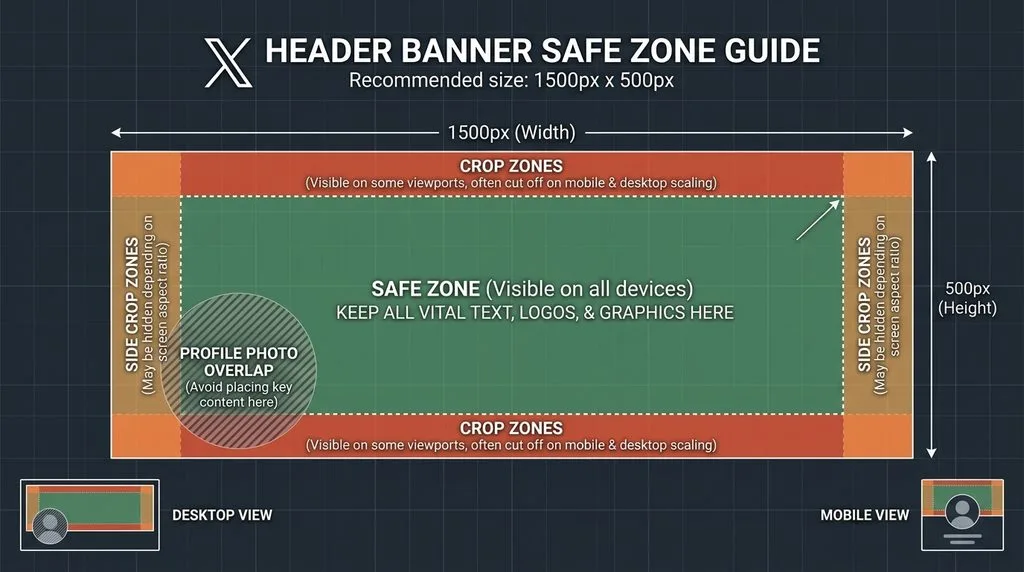
| Header / banner | 1500×500 | 3:1 | 5MB | Mobile crops ~60px top/bottom |
| Single in-stream image | 1200×675 (or 1600×900) | 16:9 | 5MB mobile / 15MB web | Uncropped in timeline |
| Square post image | 1080×1080 | 1:1 | 5MB | Cropped in timeline, expands on click |
| Portrait post image | 1080×1350 | 4:5 | 5MB | Cropped in timeline, expands on click |
| Multi-image (2) | 1200×1350 each | 7:8 / 8:9 | 5MB each | Side-by-side tiles |
| Multi-image (4) | 1200×675 each | 16:9 | 5MB each | 2×2 grid |
| Link card (large summary) | 1200×628 (min 300×157) | 1.91:1 | 5MB | og:image / twitter:image |
| Standard summary card | 144×144 min | 1:1 | — | Small square thumbnail |
| Player card poster | 1200×675 | 16:9 | — | Video/audio embed |
| Video (landscape) | 1920×1080 | 16:9 | 512MB–8GB | H.264, up to 20 min |
| Video (portrait) | 720×1280 | 9:16 | same | Vertical supported |
| Premium upload | up to 4096×4096 | any | — | No recompression |
The Premium Compression Difference (2026 Unique to X)
No other major social platform does this: X recompresses every free-account upload to roughly 85% JPEG quality, even if you upload a pristine PNG or a high-quality JPG. For screenshots, text graphics, and memes — exactly the content X is known for — that recompression introduces visible artifacts around sharp edges and text.
X Premium and Premium+ subscribers bypass this. They can upload images up to 4096×4096 pixels and X stores them without server-side recompression. If you post photography, design work, screenshots, or text-heavy graphics on X, Premium+ pays for itself in image quality alone. For everyone else, the workaround is simple: export at exactly 1200×675 (16:9) at JPEG quality 90 — starting from a higher quality means you still look acceptable after X’s 85% crush. PNGs for text graphics hold up better than JPG through recompression, at the cost of larger file size.
For AI-generated images posted to X (Grok can generate images inline now), a guide to Grok image prompts and a guide to Gemini photo editing prompts cover prompt engineering for crisp, text-free outputs that survive X’s compression.
Header/Banner: The Mobile Crop + Profile Photo Overlap
The X header is 1500×500 (3:1), but two things eat into it:
- Mobile crop: On iOS and Android apps, X crops roughly 50–60px off the top and 50–60px off the bottom, leaving a visible band closer to 1500×400 (3.75:1). On some smaller phones the crop is even more aggressive. Desktop shows the full 1500×500.
- Profile photo overlap: Your circular profile photo (~134×134px) floats over the bottom-left corner, ~15px from the left edge, overlapping the bottom ~70px of the banner. Anything in that bottom-left corner is hidden.
Safe zone: Keep all text, logos, and faces inside a center ~1200×300 band, shifted right-of-center. The left third and the top/bottom 60px are decoration only. Export as JPG quality 85 or PNG (for text), under 5MB. Animated GIFs do not play as headers — X accepts the GIF format but renders only the first frame.
Profile Photo: Circle vs Square (Verified Orgs)
Regular accounts: 400×400, circle-cropped. Keep your face centered within the central 60% — corners vanish. Max 2MB. JPG, PNG, or static GIF (animated GIF does not play).
Verified Organizations (gold checkmark): profile photos display as square, not circle. If you upgrade from a personal account to an org account, your old circle-cropped photo suddenly shows the corners — which may reveal background you didn’t intend. Re-upload a square-friendly image.
For profile photos with clean backgrounds (many X users remove the background), a guide to removing background in GIMP covers the free-tool workflow. For meme collages and before/after graphics common on X, a guide to Photoshopping a picture onto a picture covers the composite workflow.
Multi-Image Grid Crops (The Part Nobody Gets Right)
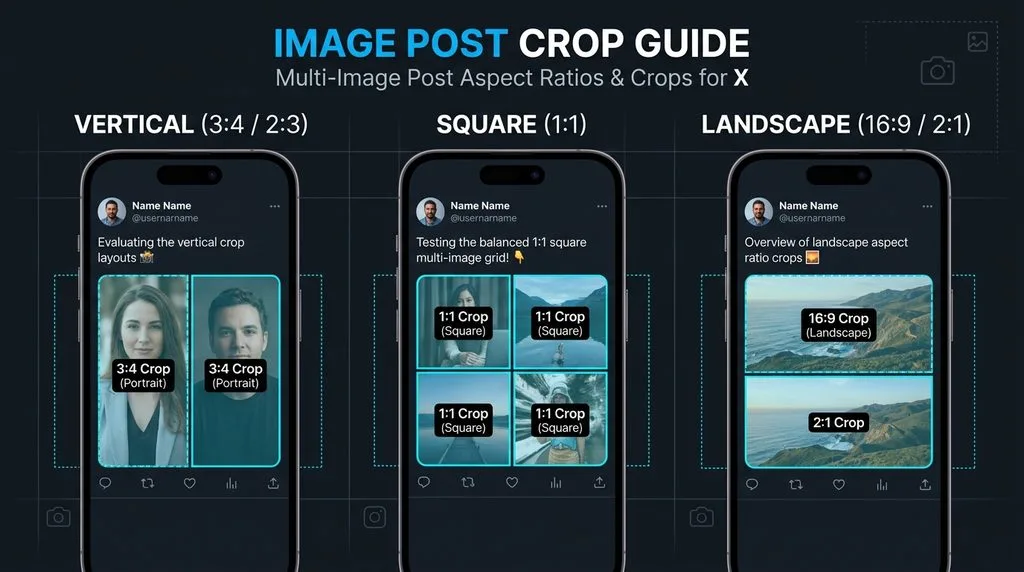
X supports up to 4 images per tweet, and the layout depends entirely on the count. Every image is cropped from the center — if your subject is off-center, it gets cut:
- 2 images: side-by-side tiles, each cropped to 7:8 (or 8:9) — roughly 1200×1350. Portrait-oriented images work best; landscape gets heavily cropped on the sides.
- 3 images: one large tile on the left (7:8, the hero) + two stacked tiles on the right (each ~16:9). Put your most important image first — it takes the dominant left position.
- 4 images: uniform 2×2 grid, each tile cropped to 16:9 (~1200×675). This is the most predictable layout — shoot all four at 16:9 and nothing important gets cropped.
Rule: for 2 or 3 images, shoot/upload portrait (4:5 or 3:4) so the 7:8 crop loses the least. For 4 images, shoot landscape 16:9. Keep the subject dead-center in every frame.
Link Preview Cards (Twitter Cards)
When you share a link, X pulls the image from your page’s twitter:image or og:image meta tag:
- Summary Card with Large Image (most common): 1200×628 (1.91:1), minimum 300×157, max 5MB. JPG, PNG, or WebP. This is the big card that gets the most clicks — large 1.91:1 cards consistently outperform small square cards in CTR.
- Standard Summary Card: small square thumbnail, minimum 144×144. Rarely used now.
- Player Card: 1200×675 poster frame, for video/audio embeds.
- App Card: app store icon, varies by platform.
If you run a website, set both og:image (1200×630 works for Facebook and X) and twitter:image (1200×628) meta tags. A single 1200×630 image renders correctly on both.
Video Specs
- Standard: 1920×1080 (16:9) landscape. Portrait 720×1280 (9:16) and square 720×720 also supported. Accepted ratios 1:3 to 3:1.
- Codec: H.264 High Profile video, AAC-LC audio. MP4 or MOV.
- Duration: 0.5 seconds to 20 minutes (free). X Premium: up to 125 minutes.
- File size: up to 512MB (some sources say 8GB on web). Premium: up to 16GB.
- Frame rate: up to 60fps.
- Upload via web for larger/longer files; mobile app caps are lower.
Export & Upload Settings That Beat X’s Compression
- Single images: export at exactly 1200×675 (16:9), JPEG quality 90, sRGB. Starting above X’s 85% recompression floor preserves detail.
- Text graphics/screenshots: use PNG — lossless, holds sharp text through recompression. Keep under 5MB (mobile) or 15MB (web).
- Multi-image: match ratio to count — portrait for 2–3 images, 16:9 landscape for 4 images. Subject centered.
- Header: 1500×500 exact, text in center-right safe zone. PNG for text, JPG for photos.
- Profile: 400×400, face centered, flatten transparency (X fills transparent areas, similar to LinkedIn).
- Premium: upload at native resolution up to 4096×4096 — no recompression, so quality is preserved.
5 Common X Sizing Mistakes
- Text in header top/bottom 60px or bottom-left corner. Cropped on mobile or hidden behind profile photo. Keep text center-right.
- Off-center subjects in multi-image tweets. X crops every grid tile from the center. Recompose with subject dead-center.
- Uploading PNG photos (huge files). PNG is for text/screenshots; photos should be JPG. A 12MP PNG can exceed the 5MB mobile cap.
- Using 1200×630 (Facebook size) for X cards and expecting 16:9. X large cards are 1.91:1 (1200×628). 1200×630 works but is slightly off — use 1200×628 for exact.
- Forgetting Premium removes recompression. If you post high-quality visuals regularly and are on free X, your images are being crushed. Either upgrade or export at quality 90 PNG for text.
Frequently Asked Questions
What is the best X (Twitter) image size for posts in 2026?
1200×675 pixels (16:9 aspect ratio) for single images — it displays uncropped in the timeline. 1600×900 also works. Square (1080×1080) and portrait (1080×1350, 4:5) are accepted but cropped in the timeline; they expand to full size on click. Max 5MB per image on mobile, 15MB on web.
What size is an X (Twitter) header photo?
1500×500 pixels (3:1 aspect ratio), max 5MB, JPG/PNG/GIF. Mobile crops ~60px off the top and bottom, and your circular profile photo overlaps the bottom-left corner. Keep all text and logos inside a center ~1200×300 band, shifted right-of-center.
What size is an X (Twitter) profile picture?
400×400 pixels (1:1), max 2MB. Regular accounts display it as a circle — keep your face centered within the central 60%. Verified Organizations (gold checkmark) display profile photos as a square. Animated GIFs do not play for profile photos.
How does X crop multi-image tweets?
2 images: side-by-side, each cropped to 7:8 (portrait). 3 images: one large tile on the left (7:8) + two stacked on the right (16:9 each). 4 images: 2×2 grid, each 16:9. All crops are from the center. Keep your subject centered in every frame. Max 4 images per tweet.
What size is a Twitter Card (link preview) image?
Summary Card with Large Image (most common): 1200×628 pixels (1.91:1), minimum 300×157, max 5MB. Standard Summary Card: 144×144 minimum square. Player Card: 1200×675 poster. Set twitter:image and og:image meta tags on your site; 1200×630 renders correctly on both X and Facebook.
Does X Premium improve image quality?
Yes. X Premium and Premium+ subscribers can upload up to 4096×4096 pixels with no server-side recompression. Free accounts have every image recompressed to roughly 85% JPEG quality. For text graphics, screenshots, and photography, the difference is visible.
What is the maximum video size on X?
Free accounts: up to 20 minutes, up to 512MB–8GB (varies by upload method), H.264/AAC. X Premium: up to 125 minutes and 16GB. Standard resolution 1920×1080 (16:9); portrait 720×1280 and square 720×720 also supported. Upload via web for larger files.
Can I use an animated GIF as my X header or profile photo?
No. X accepts GIF as a file format for headers and profile photos, but it does not play the animation — only the first frame displays. Animated GIFs work only in tweets (in-stream), where they loop normally.
Final Verdict
X sizing is three numbers and one premium perk: 400×400 profile, 1500×500 header (text center-right), 1200×675 single image / 1200×628 link card. Multi-image tweets follow count-based grid crops (2=7:8, 3=1-large+2-stacked, 4=2×2 16:9) — always center your subject. And in 2026, the quality question is whether you pay for Premium: free accounts get every image recompressed to ~85% JPEG, while Premium uploads up to 4096×4096 untouched. Export at quality 90 or use PNG for text, keep header text out of the crop zones, and your X visuals will look sharp on every device.