TikTok Image Sizes 2026: Video, Cover Crop, Safe Zones, Carousel & TikTok Shop
TL;DR: The Short Answer
Every TikTok video and photo post is 1080×1920 pixels (9:16 vertical) — that part is simple. The part everyone gets wrong is the cover image: you upload a cover at 1080×1920, but TikTok’s profile grid crops it to a center 1080×1080 square, cutting 420 pixels off the top and 420 pixels off the bottom.
If your face, hook text, or logo sits in those top/bottom bands, it looks perfect in the feed and decapitated on your profile. Keep every important element inside the center 1080×1080 square. For on-screen text during playback, keep it inside the center safe zone of roughly 960×1280 pixels — the top ~130px holds navigation, the right ~140px holds the like/comment/share icons, and the bottom 250–480px holds the caption, username, music credit, and CTA buttons. File-size caps differ by device: Android app 72MB, iOS app ~287MB, web uploader up to 2GB — if a long 1080p video refuses to upload from your phone, use the web uploader. Photo Mode carousels accept up to 35 images at 1080×1920. TikTok Shop product images must be 1:1 square, minimum 600×600px (1200×1200 recommended), white/light background, product fills 80%+ of the frame, max 9 images.
The Master TikTok Size Table (2026)
| Format | Size (px) | Aspect ratio | Max file | Notes |
|---|---|---|---|---|
| Video (in-feed) | 1080×1920 | 9:16 | 72MB Android / 287MB iOS / 2GB web | MP4/MOV, H.264, 23–60fps |
| Cover / thumbnail | 1080×1920 | 9:16 | ~5MB | Grid crops to center 1080×1080 square |
| Profile photo | 200×200 min (upload 400×400+) | 1:1 | 5MB | Circle-cropped |
| Photo post (single) | 1080×1920 | 9:16 | ~20MB | JPG/PNG/WebP |
| Photo carousel (Photo Mode) | 1080×1920 each | 9:16 | ~500MB total | Up to 35 images |
| TikTok Shop product image | 600×600 min (1200×1200 rec.) | 1:1 mandatory | 5–10MB | Max 9 images, white bg |
| In-Feed ad | 1080×1920 | 9:16 | 500MB | 5–60 sec (5–16 sec for Shop) |
| Carousel ad | 800×800 min | 1:1 | 20MB/card | 2–35 images |
| Brand Takeover ad | 1080×1920 or 640×640 | 9:16 or 1:1 | 500MB / 50KB | 3–5 sec |
The Cover-Image Trap (Why Your Profile Grid Looks Broken)
This is the single most common TikTok sizing mistake, and almost no guide explains it in pixels. Here is exactly what happens:
- You select or upload a cover image at 1080×1920 (full vertical frame).
- In the For You feed, search results, and on the video itself, the cover displays at full 9:16 — everything looks fine.
- On your profile grid, TikTok displays covers in a 3-column layout and crops each one to a centered 1080×1080 square. That means 420 pixels are cut from the top and 420 pixels from the bottom of your 1920px-tall cover.
- If your hook text or your face sits near the top (where most creators put it) or near the bottom, it vanishes from the grid. Your profile looks like a wall of random backgrounds with no faces.
The fix: Design every cover with all important content — face, text, logo, product — inside the center 1080×1080 square. The top 420px and bottom 420px are decoration only: visible in the feed, invisible on your profile. Use the cover-title text field in TikTok’s uploader (it overlays text in the safe center area) rather than burning text into the top of the image.
Safe Zones Measured in Pixels (Keep Text Here)
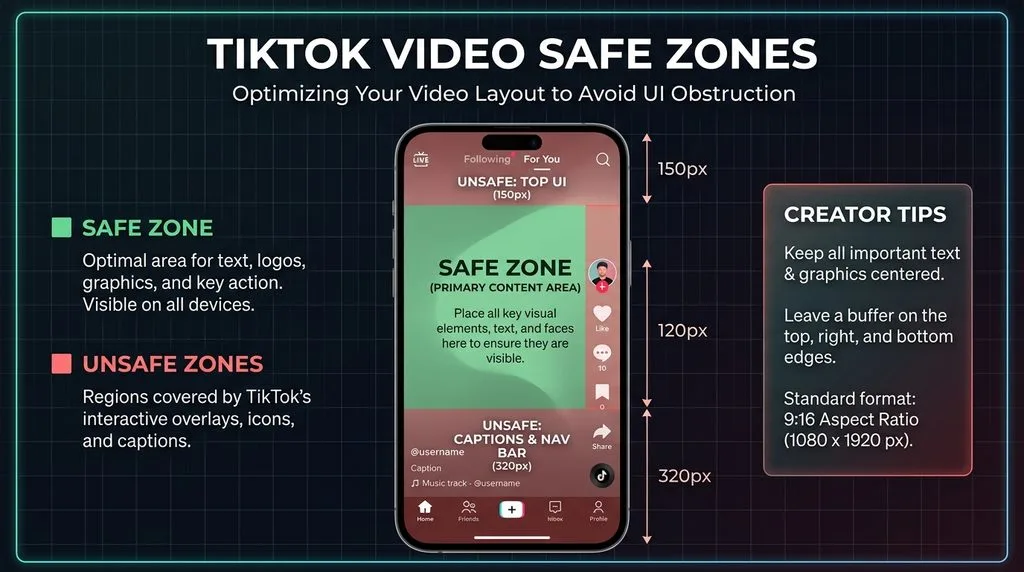
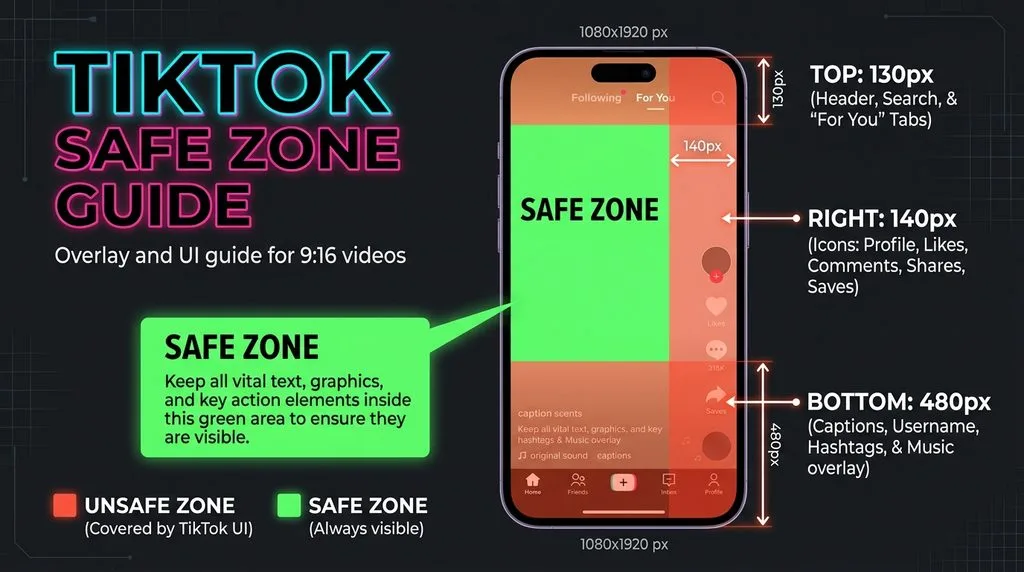
During video playback, TikTok’s interface overlays cover roughly 30% of the screen. Here are the pixel measurements, cross-verified across multiple 2026 sources:
- Top: ~130–150px — navigation bar, search icon, “Following / For You” tabs. Keep titles and faces out of this band.
- Right: ~140–150px — profile avatar, like, comment, bookmark, share buttons, and spinning music disc. Never put text or a face in this column.
- Bottom: ~250–480px — username, caption (can be 2–3 lines), music credit, and “Shop now” / “Follow” CTA buttons. The deeper your caption, the more bottom space it eats. Keep critical text above the bottom 480px.
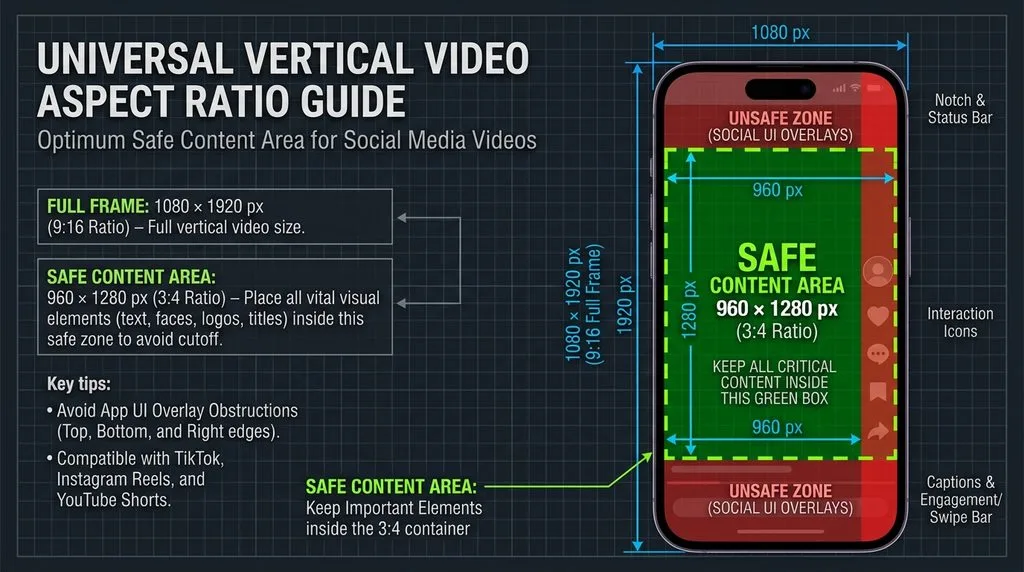
- Center safe zone: approximately 960×1280 pixels, centered horizontally and sitting between the top nav and the bottom caption. This is the only area guaranteed visible on every device.
Practical rule: if you add on-screen text (subtitles, hooks, callouts), keep it in the upper-middle of the frame, centered horizontally, at least 150px from the top and 480px from the bottom, and at least 150px from the right edge. Burned-in subtitles should sit in the lower-middle area, not the absolute bottom.
Video Specs: Resolution, Codec & File Size by Device
TikTok’s recommended video is 1080×1920, 9:16, MP4 container, H.264 codec, AAC audio, 30fps (60fps for high-motion). Minimum accepted resolution is 720p; the developer API allows up to 4096×4096 but anything above 1080p gets downscaled. TikTok does not currently support true 4K playback — uploading 4K just inflates file size and risks hitting the cap.
File-size caps by upload method (the reason uploads fail):
- Android app: ~72MB. A 10-minute 1080p video will exceed this.
- iOS app: ~287MB. More headroom, but long videos still fail.
- Web browser (tiktok.com): 500MB for videos under 3 min, up to 2GB for 3–10 min videos.
- Ads Manager: 500MB, 60 seconds max.
If your video refuses to upload from the phone app, it is almost always over the device file cap. Upload from a desktop browser instead — the web uploader accepts far larger files and applies less aggressive compression. For filming, the back camera produces sharper, less distorted footage than the front camera; a guide to front vs back camera accuracy explains why front-camera selfies look different. For maximum source quality, a guide to highest resolution cameras covers capture devices that hold up under TikTok’s compression.
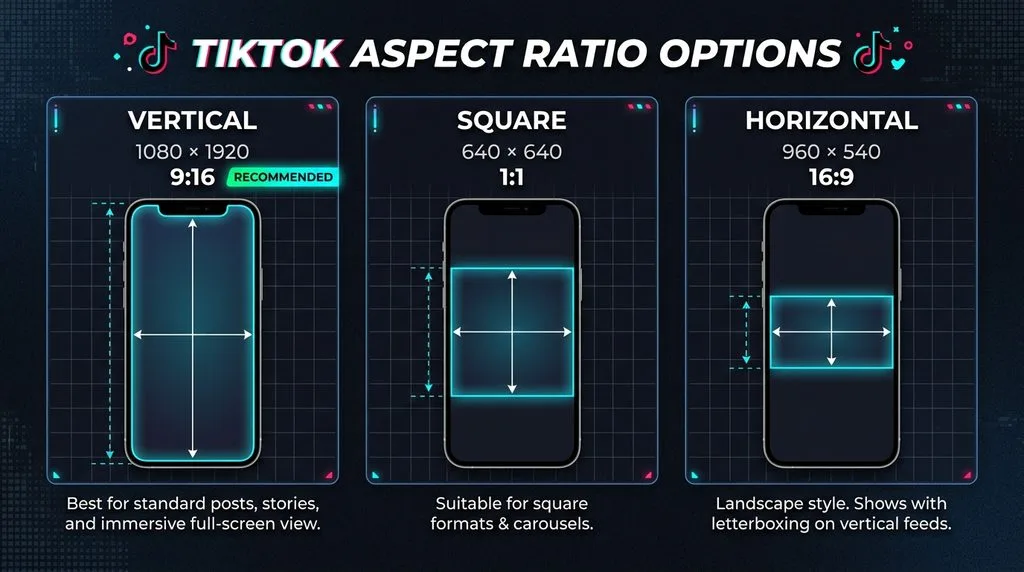
Photo Mode & Carousels (Up to 35 Images)
TikTok’s Photo Mode lets you post static image carousels that auto-advance with looping music. Specs:
- Size: 1080×1920 (9:16) per image. Square 1:1 and 4:5 portrait are accepted but display with black/white side bars — they look smaller.
- Count: 2 to 35 images per post.
- Format: JPG, PNG, or WebP. ~20MB per image; total post cap ~500MB.
- Music: required (loops); minimum 2 seconds.
- Hook on slide 1: same cover-grid rule applies — slide 1’s center 1080×1080 is what shows in your profile grid.
For portrait photos in carousels, light retouching survives compression better than heavy filters. A guide to removing double chin and reshaping face covers subtle portrait adjustments, but keep edits natural — TikTok’s audience detects over-retouching quickly.
TikTok Shop Product Image Requirements (Sellers Must Read)
TikTok Shop has its own strict image specs, enforced by the system at upload:
- Main image: 1:1 square, mandatory. 3:4 to 4:3 may be accepted but 1:1 is required for the “Good” listing-quality tier.
- Minimum resolution: 600×600px. Recommended: 1200×1200 or larger. Maximum 20000×20000.
- File size: 5–10MB max (varies by region). JPG and PNG only — HEIC and WebP are auto-converted to JPG.
- Count: up to 9 images per listing. Minimum 5 images to qualify for the “Good” listing tier (which boosts visibility).
- Product fills at least 80% of the frame. White or light-colored background preferred for the main image.
- Media Center storage: up to 5GB per seller account.
For fashion products on TikTok Shop, a guide to ghost mannequin photography covers the invisible-mannequin look that performs well in square product frames.
Export & Upload Settings That Beat TikTok’s Compression
TikTok compresses every upload. To minimize quality loss:
- Export at exactly 1080×1920. Never upload larger — it gets downscaled and re-compressed.
- H.264 codec, MP4 container, AAC audio 128kbps+. This is TikTok’s native pipeline; other codecs get transcoded (more quality loss).
- 30fps or 60fps. 60fps for fast motion; 30fps for talking heads (smaller file).
- Target bitrate ~8–12 Mbps for 1080p30. This keeps a 60-second video around 60–90MB — under the iOS cap but possibly over Android’s 72MB. For Android, target ~6 Mbps.
- Upload via web browser for long videos to avoid the 72MB/287MB device caps.
- For photos/carousels: JPG quality 85, sRGB, 1080×1920. WebP is accepted but JPG is safer.
5 Common TikTok Sizing Mistakes
- Cover text near the top or bottom. Cropped out in the profile grid (420px each end). Keep everything in the center 1080×1080.
- On-screen text in the right 140px column. Hidden behind like/comment/share buttons. Keep text centered.
- Subtitles at the absolute bottom. Covered by caption/CTA (up to 480px). Raise subtitles into the lower-middle.
- Uploading long videos from the Android app. 72MB cap rejects them. Use the web uploader (up to 2GB).
- Non-square TikTok Shop main images. Rejected or downgraded in listing quality. Use 1:1, minimum 600×600.
Frequently Asked Questions
What is the best TikTok video size in 2026?
1080×1920 pixels, 9:16 vertical aspect ratio, MP4 with H.264 codec, 30 or 60 fps. Minimum accepted is 720p; anything above 1080p gets downscaled. Target bitrate 8–12 Mbps for 1080p30 to stay under device file caps.
What size is a TikTok cover image?
Upload at 1080×1920 (9:16). But the profile grid crops it to a centered 1080×1080 square, cutting 420px off the top and 420px off the bottom. Keep faces, text, and logos inside the center 1080×1080 square or they vanish from your profile.
What are the TikTok safe zones in pixels?
Keep clear of: top ~130–150px (navigation), right ~140–150px (like/comment/share icons), bottom ~250–480px (caption, username, CTA buttons). The always-visible center safe zone is roughly 960×1280 pixels. Put all on-screen text inside it.
What is the maximum file size for TikTok?
Android app: ~72MB. iOS app: ~287MB. Web browser uploader: 500MB (under 3 min) up to 2GB (3–10 min). TikTok Ads Manager: 500MB. If a video fails to upload from your phone, it is almost certainly over the device cap — use the web uploader.
What size are TikTok photo posts and carousels?
Photo Mode carousels: 1080×1920 (9:16) per image, 2 to 35 images, JPG/PNG/WebP, ~20MB per image. Square and 4:5 images are accepted but display with side bars. Slide 1 follows the same center-1080×1080 grid-crop rule.
What are TikTok Shop product image requirements?
Main image must be 1:1 square, minimum 600×600px (1200×1200 recommended), JPG/PNG only, 5–10MB max. Up to 9 images per listing; minimum 5 to qualify for the “Good” listing tier. Product should fill 80%+ of the frame on a white/light background.
Why is my TikTok video blurry after upload?
Usually one of three causes: you uploaded below 720p, you uploaded over the device file cap and TikTok compressed it heavily, or you used a non-H.264 codec that got transcoded. Export at 1080×1920 H.264 MP4, stay under the file cap, and upload via web for long videos.
What size is a TikTok profile picture?
Minimum 200×200 pixels; upload at 400×400+ for sharpness. It displays as a circle, so keep your face centered within the central 60%. Max file size 5MB, JPG or PNG.
Final Verdict
TikTok sizing is one number and two traps. The number: 1080×1920 (9:16) for everything — video, covers, photo posts, carousels. Trap one: the profile grid crops covers to a center 1080×1080 square, so design inside that box. Trap two: the UI overlays (top nav, right icons, bottom caption) cover the edges during playback, so keep text in the center 960×1280 safe zone. Add in the device-specific file caps (Android 72MB is the tight one) and TikTok Shop’s 1:1 square rule, and you will never upload a cropped, blurry, or rejected TikTok again.