LinkedIn Image Sizes 2026: Profile, Banner, Feed, Carousel & Ads — Every Pixel
TL;DR: The Short Answer
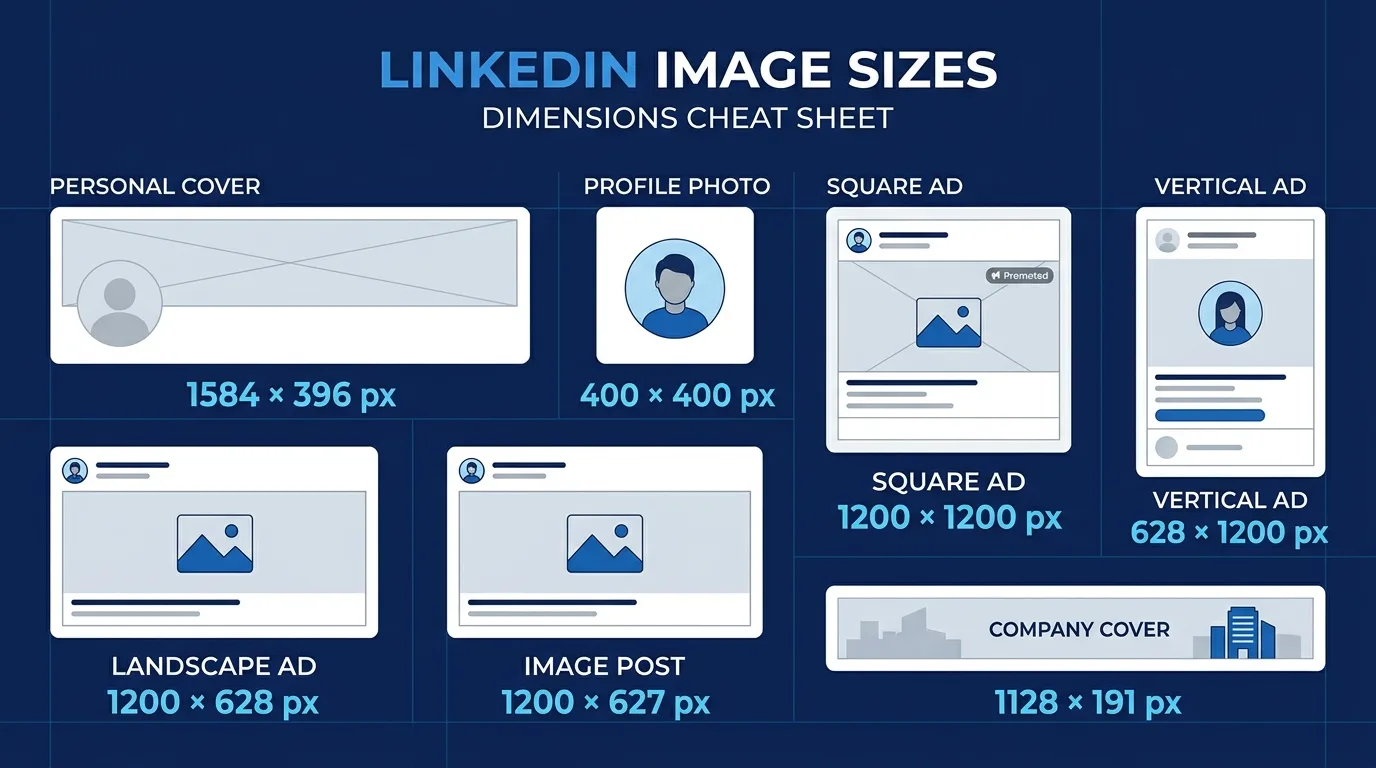
LinkedIn has two different banner sizes — and that is the mistake everyone makes. Personal profile banners are 1584×396 pixels (4:1). Company page covers are 1128×191 pixels (5.9:1) — barely half the height. Use the wrong one and your text gets cropped to nothing. Profile photos are 400×400 (min 200×200), circle-cropped, and transparent PNGs get filled with a solid gray box — always flatten onto a solid background.
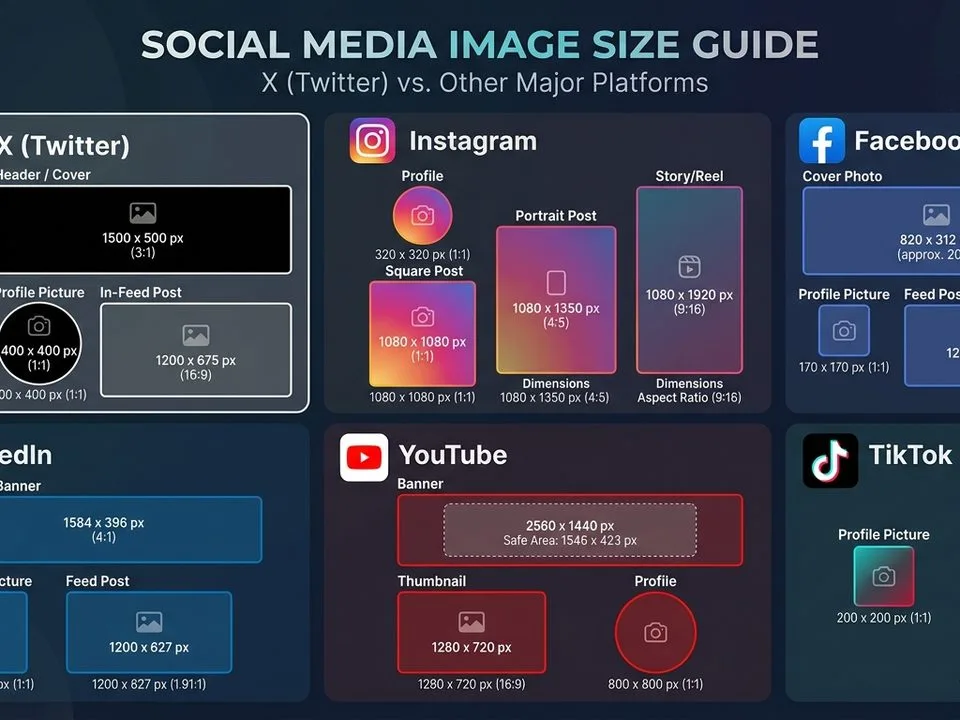
Feed posts accept ratios from 3:1 (wide) to 4:5 (tall) but render at a maximum of 4:5, so 1080×1350 (4:5 portrait) takes the most screen space on mobile, while 1080×1080 square never crops anywhere. Link previews use 1200×627 (1.91:1). Document carousels upload as PDF/PPT/DOC up to 100MB and 300 pages, with slides best at 1080×1080 square or 1080×1350 portrait. File caps: 8MB for profile/banner, 10MB for post images, 5GB for video (up to 10 minutes organic). LinkedIn Stories were shut down in 2021 — they no longer exist.
The Master LinkedIn Image Size Table (2026)
| Placement | Size (px) | Aspect ratio | Max file | Notes |
|---|---|---|---|---|
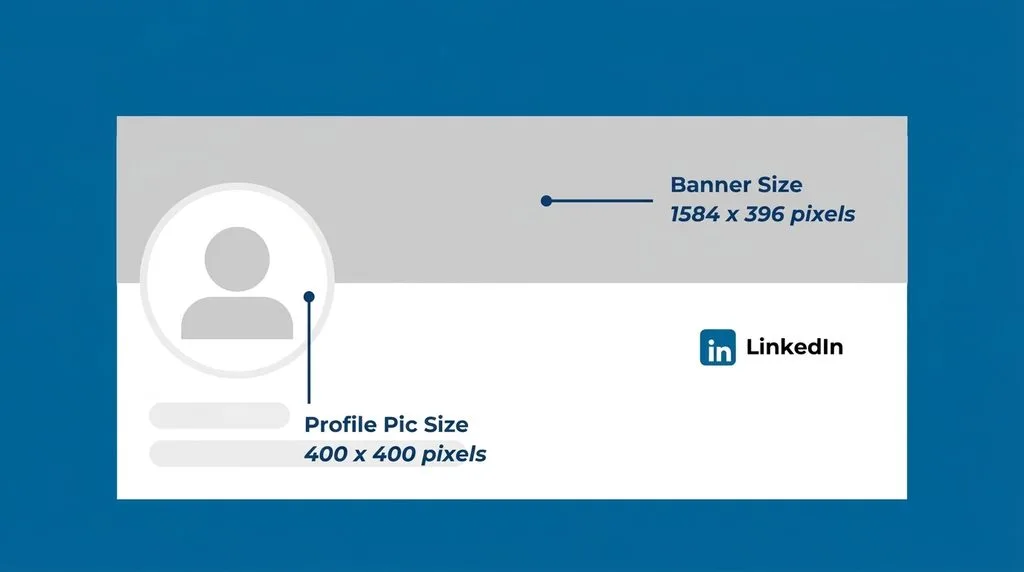
| Profile photo | 400×400 (min 200×200) | 1:1 | 8MB | Circle-cropped; flatten transparent PNGs |
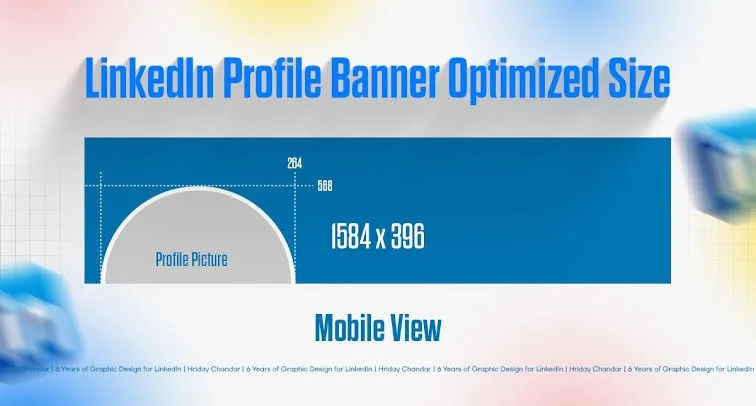
| Personal banner / background | 1584×396 | 4:1 | 8MB | Left third covered by profile photo |
| Company page cover | 1128×191 | 5.9:1 | 8MB | Very short — different from personal |
| Company logo | 300×300 (upload 400×400) | 1:1 | — | Square, displays small |
| Feed post — portrait (max space) | 1080×1350 | 4:5 | 10MB | Tallest rendered frame |
| Feed post — square (safest) | 1080×1080 | 1:1 | 10MB | Never crops anywhere |
| Feed post — landscape / link preview | 1200×627 | 1.91:1 | 10MB | Link shares, og:image |
| Multi-image post | Match image 1 | uniform | 10MB each | Up to 20 images; first sets layout |
| Article cover | 1200×644 | 1.86:1 | 10MB | LinkedIn long-form articles |
| Newsletter header | 1920×1080 | 16:9 | — | LinkedIn Newsletter |
| Document carousel | 1080×1080 or 1080×1350/slide | 1:1 or 4:5 | 100MB total | PDF/PPT/DOC, up to 300 pages |
| Video post | 1920×1080 (landscape) / 1080×1920 (vertical) | 16:9 or 9:16 | 5GB | Up to 10 min organic, MP4 H.264 |
| Single image ad | 1200×1200 | 1:1 | 5MB | — |
| Carousel ad card | 1080×1080 | 1:1 | 10MB/card | — |
| Spotlight / Follower ad logo | 100×100 | 1:1 | 2MB | — |
The Two-Banner Trap (Personal vs Company)
This is the #1 LinkedIn sizing mistake, and it costs people job opportunities and companies brand credibility. The two banners are different sizes and different shapes:
- Personal profile banner: 1584×396 (4:1). A wide, moderately tall strip. You can fit a tagline, contact info, and a subtle background.
- Company page cover: 1128×191 (5.9:1). A very short, wide strip — barely half the height of the personal banner. Text must be large and minimal; anything detailed becomes unreadable.
If you design a personal banner at 1584×396 and upload it to a company page, LinkedIn crops the top and bottom, cutting your tagline in half. If you design a company cover at 1128×191 and upload to a personal profile, it stretches and blurs. They are not interchangeable. Create two separate files.
Banner Safe Zones: Left Third Is Covered
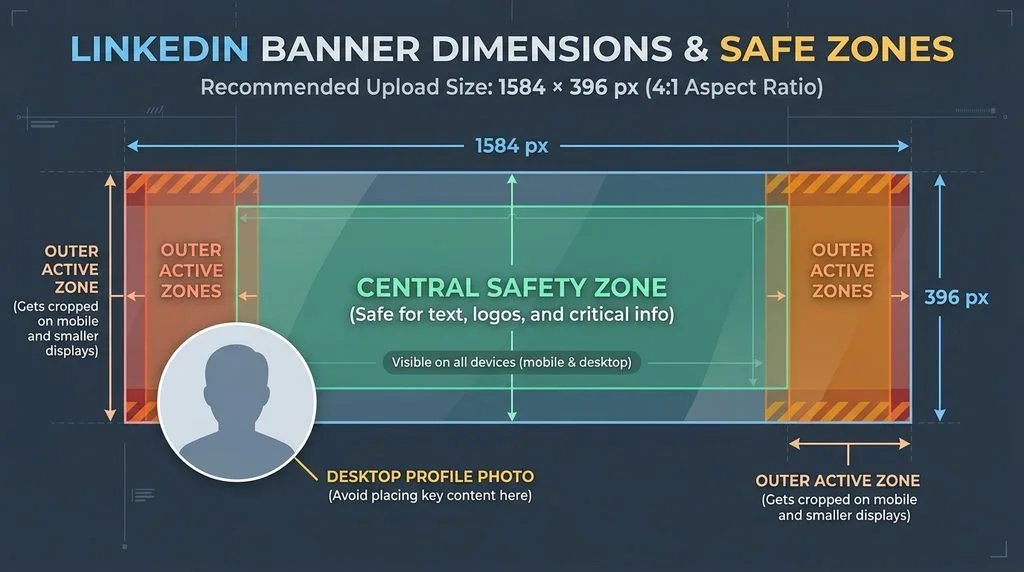
On a personal profile, your circular profile photo overlaps the bottom-left of the banner on desktop. On mobile, the crop shifts and roughly the left 20% and right 10% may be trimmed. The safe-zone consensus across 2026 sources:
- Keep all text and logos in the right two-thirds of the banner — never in the left third, where the profile photo sits.
- Mobile-safe zone: roughly 1350×230 pixels, centered horizontally, upper-center of the canvas.
- Text-safe zone: roughly 1000×250 pixels, right-of-center.
- Keep the left third as pure background — no text, no logos, no faces.
Export banners as PNG-24 if they contain text (sharper edges) or JPG quality 85 if photographic. Keep under 8MB. For professional headshot retouching before you put it in the profile circle, a guide to removing blemishes and a guide to removing clothing wrinkles cover the two fixes that matter most for suit-and-tie headshots.
Profile Photo: Circle Crop + the Gray-Box Trap
LinkedIn displays every profile photo as a circle, cropped from the center of your uploaded square. Two rules:
- Keep your face centered within the central 60% of the square — corners are clipped by the circle mask. Leave margin around your head and shoulders.
- Never upload a transparent PNG. LinkedIn does not preserve transparency — it fills any transparent area with a solid gray box, which looks broken. Flatten your image onto a solid white or colored background before export.
Upload at 400×400 minimum; 800×800 is sharper on Retina displays. Use a professional headshot: shoulders square, eyes at camera, plain background, business attire. A guide to mirror vs camera accuracy explains why a selfie taken in a mirror looks different from a proper camera headshot.
Feed Posts: 3:1 to 4:5, But Renders Max 4:5
LinkedIn feed images accept aspect ratios from 3:1 (very wide) to 4:5 (tall portrait), but it only renders up to 4:5 in the feed. Anything taller gets cropped. Practical choices:
- 1080×1350 (4:5 portrait): maximum vertical screen space, especially on mobile. Gets ~30% more real estate than landscape. Best for single-image posts.
- 1080×1080 (1:1 square): the safe universal choice — never cropped in any layout, works in multi-image posts and ads.
- 1200×627 (1.91:1 landscape): best for link shares and article previews. Displays smaller in feed.
- Multi-image (up to 20): the first image determines the layout. If image 1 is landscape, it takes the top row; if square/portrait, it takes the left column. Use one consistent ratio across all images — mixing ratios causes uneven cropping.
Max 10MB per image. JPG quality 85, sRGB. No WebP. For creating graphics and text overlays for LinkedIn posts, a guide to Photoshop tools covers the toolbar essentials.
Document Carousels: PDF Up to 100MB, 300 Pages
LinkedIn carousel posts are actually document uploads (PDF, PPT, PPTX, DOC, DOCX), not image sequences. Specs:
- Max file size: 100MB. Max pages: 300. Viewers can download the PDF.
- Slide size: 1080×1080 (square) or 1080×1350 (4:5 portrait). Avoid landscape slides — they render tiny on mobile.
- Sweet spot: 5–15 slides. More than that and swipe-through drops.
- Hook on slide 1 — the first slide is what shows in the feed.
- Export from Canva, PowerPoint, or Google Slides as PDF. Keep text large (minimum 40pt at 1080 width) for mobile readability.
Video, Articles & Ads (Quick Specs)
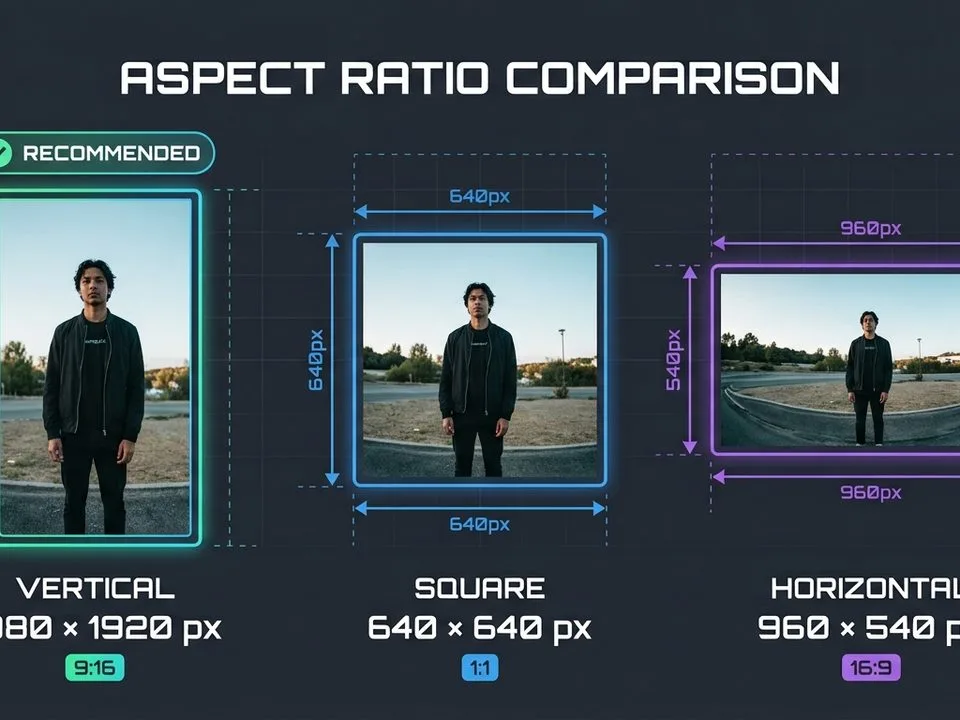
- Video posts: MP4 H.264, up to 10 minutes organic (longer on some accounts), max 5GB. Landscape 1920×1080 (16:9) standard; vertical 1080×1920 (9:16) supported and performs well on mobile. 30fps.
- Article covers (long-form): 1200×644 (1.86:1).
- Newsletter headers: 1920×1080 (16:9).
- Single image ads: 1200×1200 (1:1), max 5MB.
- Carousel ads: 1080×1080 per card, max 10MB/card.
- Spotlight / Follower ads: logo 100×100, max 2MB.
- Document ads: PDF up to 100MB, 300 pages.
5 Common LinkedIn Sizing Mistakes
- Using personal banner size (1584×396) on a company page. Company cover is 1128×191 — half the height. Text gets cropped.
- Text in the left third of a personal banner. Hidden behind the circular profile photo. Keep text right-of-center.
- Uploading a transparent PNG profile photo. LinkedIn fills transparency with gray. Flatten onto a solid background.
- Landscape carousel slides. Render tiny on mobile. Use 1080×1080 or 1080×1350.
- Mixing ratios in a multi-image post. First image sets the layout; mismatched ratios get cropped unevenly. Use one ratio.
Frequently Asked Questions
What is the correct LinkedIn banner size in 2026?
Personal profile banner: 1584×396 pixels (4:1 aspect ratio). Company page cover: 1128×191 pixels (5.9:1). They are different shapes — do not use the same file for both. Max file size 8MB, JPG or PNG. Keep text in the right two-thirds (the left third is covered by your profile photo).
What size should a LinkedIn profile photo be?
400×400 pixels minimum (upload 800×800 for sharpness on Retina displays), 1:1 square, max 8MB. LinkedIn displays it as a circle, so keep your face centered within the central 60%. Do not upload transparent PNGs — LinkedIn fills transparency with gray. Flatten onto a solid background.
What is the best image size for LinkedIn feed posts?
1080×1350 pixels (4:5 portrait) for maximum vertical screen space on mobile. 1080×1080 (1:1 square) is the safest universal choice — never cropped. 1200×627 (1.91:1 landscape) for link shares and article previews. LinkedIn accepts 3:1 to 4:5 but renders at max 4:5. Max 10MB per image, up to 20 images per post.
What size are LinkedIn carousel (document) posts?
Upload as PDF, PPT, or DOC — max 100MB, up to 300 pages. Design slides at 1080×1080 (square) or 1080×1350 (4:5 portrait). Avoid landscape slides (too small on mobile). Sweet spot is 5–15 slides. Slide 1 is the hook that shows in the feed.
What is the LinkedIn company page cover size?
1128×191 pixels (5.9:1 aspect ratio) — very short and wide. Different from the personal profile banner (1584×396). Keep text large and minimal; detailed designs become unreadable. Company logo is 300×300 square.
Why does my LinkedIn profile photo have a gray background?
Because you uploaded a PNG with transparent areas. LinkedIn does not preserve transparency and fills it with solid gray. Re-export the image flattened onto a white or colored background (JPG or flattened PNG) and re-upload.
What is the LinkedIn video size limit?
Organic video posts: up to 10 minutes (longer on select accounts), max file size 5GB, MP4 with H.264 codec, 30fps. Landscape 1920×1080 (16:9) is standard; vertical 1080×1920 (9:16) is supported and performs well on mobile. Video ads: up to 30 minutes, 200MB–500MB depending on format.
Do LinkedIn Stories still exist?
No. LinkedIn shut down Stories in 2021. There is no Stories format on LinkedIn in 2026. Do not create 1080×1920 vertical content expecting a Stories placement — use vertical video in the regular feed instead.
Final Verdict
LinkedIn sizing is two banner sizes and three feed ratios. Memorize 1584×396 for personal banners, 1128×191 for company covers, 400×400 circle-cropped profile photos (flattened, never transparent), and 1080×1350 (4:5) or 1080×1080 (square) for feed posts. Keep banner text right-of-center, use one consistent ratio in multi-image posts, and design carousel slides square or portrait for mobile. Get those right and your LinkedIn presence looks polished on every device — which, on a professional network, is the entire point.