Top Beauty Retouching Services in 2026: How to Choose the Best One for Flawless, Natural Skin
TL;DR — The short answer: The best beauty retouching services preserve real skin texture while removing distractions — they use frequency separation and dodge & burn, never blur filters. Prices run from about $2 per image for basic cleanup to $25–$100 for high-end editorial work. Always test a studio with a free trial and inspect its samples at 100% zoom. Top picks in 2026 include Retouching Labs, FixThePhoto, BeEdits, and ClippingExpertAsia — but the right one depends on your volume, budget, and how natural you want the result to look.
What Is Beauty Retouching, Exactly?
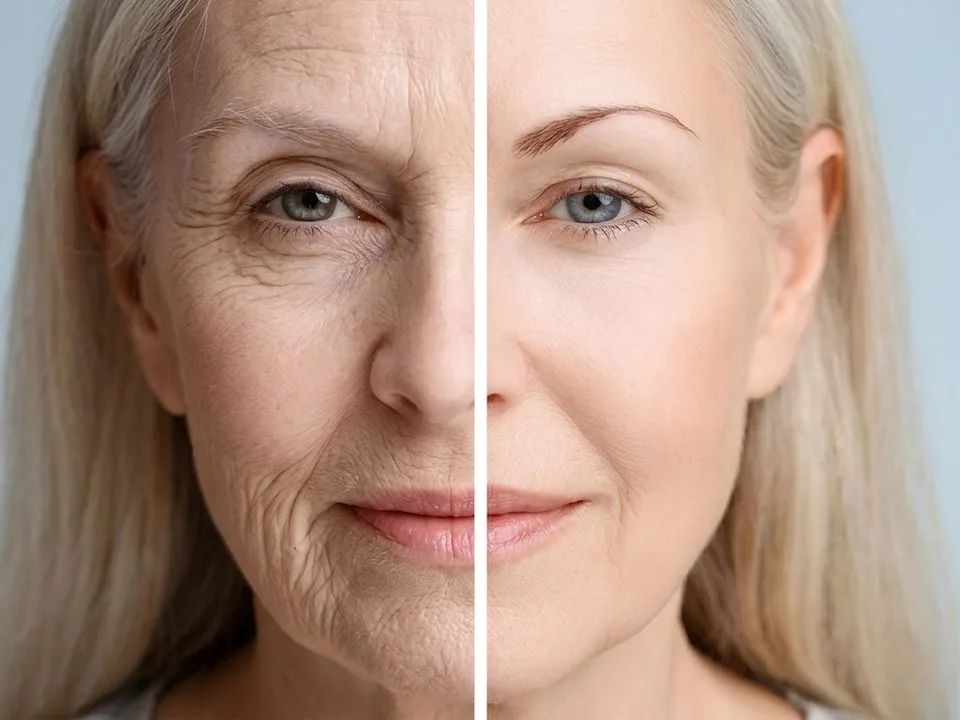
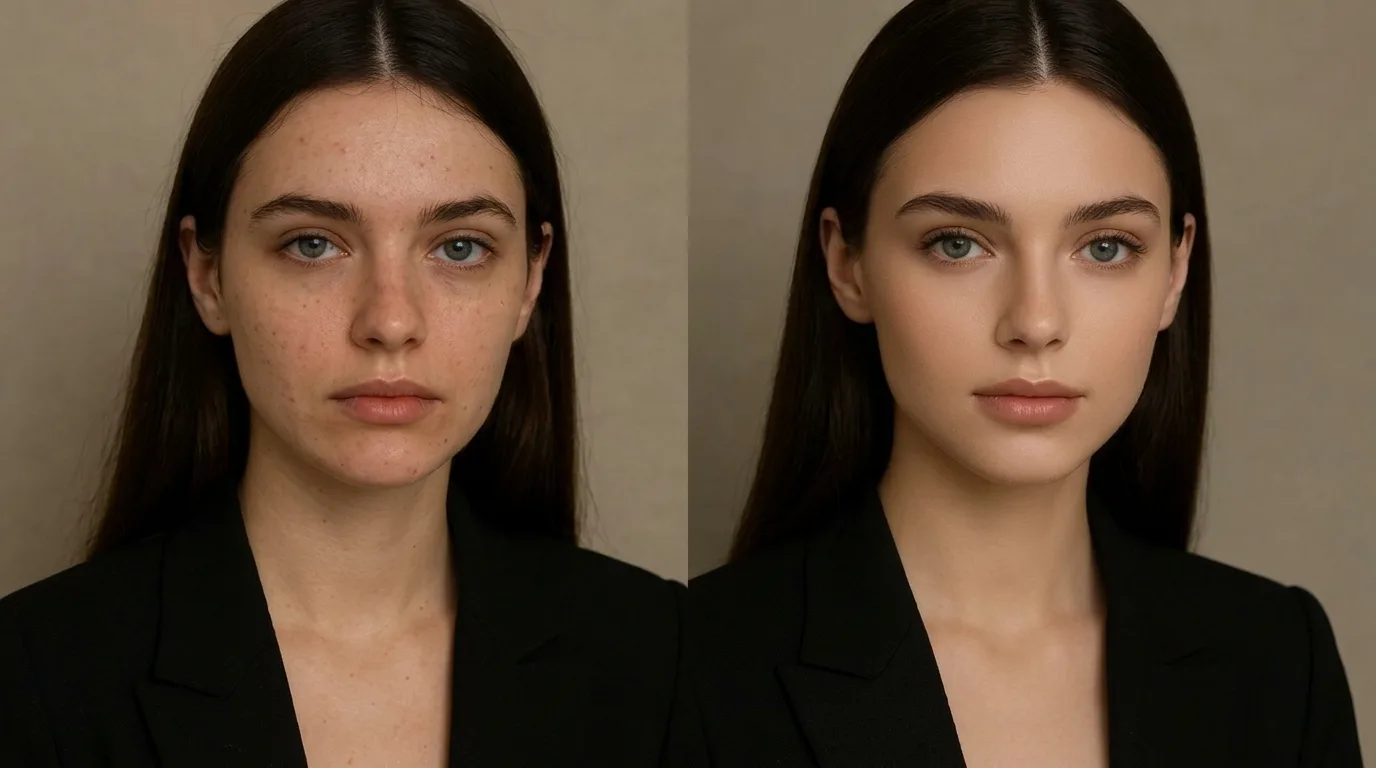
Beauty retouching is the professional enhancement of portrait and close-up images so the skin, eyes, hair, and makeup look their best — without the person looking like someone else. Done well, it is invisible. Done badly, and everyone can tell: the skin has a plastic sheen, the pores are gone, and the face looks flat under even lighting.
A lot of people confuse it with a filter. A filter applies the same smoothing to every pixel. A retoucher makes decisions: this blemish goes, that freckle stays, this shadow under the eye is softened but not erased. That judgment is what you are paying for.
At a professional standard, a proper beauty retouch includes:
- Skin work that keeps texture — evening tone without destroying pores, usually via frequency separation
- Dodge & burn sculpting — rebuilding the shape and dimension that tone-correction flattens
- Blemish and distraction removal — one at a time, never with a global slider
- Hair cleanup — taming flyaways and rebuilding the outline where needed
- Teeth whitening and eye enhancement — by an amount nobody would spot as an edit
- Color and tone polish — plus a final quality check at 100% zoom
If a service’s sample gallery cannot show you all of that, it is not really beauty retouching — it is cleanup with a side of smoothing.
Why Professional Beauty Retouching Is Worth It
You might be wondering whether you can just run a portrait through an app and call it done. For a selfie headed to Instagram, sure. For a skincare brand’s product page, a model’s portfolio, or a magazine spread? Not even close.
Here is what a professional service actually buys you:
- Consistency across a campaign. A hundred photos should look like they belong together, not like a hundred different people edited them. Studios that assign you a dedicated retoucher nail this.
- Results that hold up at print size. A frame bound for a full-page magazine spread or a billboard is judged at 100% magnification, where every shortcut shows.
- Time you get back. A single high-end beauty retouch can take a skilled editor 30 minutes to several hours. Multiply that by a shoot of 200 images and the math gets uncomfortable fast.
- Brand trust. Studies cited across the industry suggest professionally retouched imagery lifts conversion and purchase intent on product pages — customers read polish as credibility.
The catch is that the difference between a $2 edit and a $50 edit is invisible in a thumbnail. You only see it when you zoom in. Which is exactly where we are headed next.
The Three Tiers of Beauty Retouching Services
Not every “beauty retouch” is the same thing. Studios generally sell three levels, and knowing which one you need keeps you from overpaying — or underbuying.
Basic / Light Retouching ($0.25–$3 per image)
Think of this as cleanup: blemish removal, minor under-eye softening, simple color correction, and light smoothing. It is perfect for high-volume social content, catalog headshots, and e-commerce where the face is small in frame. What it usually does not include: frequency separation, dodge & burn sculpting, or body reshaping. If you try to get editorial results at this price, you will get plastic skin.
Professional / Mid-Tier Beauty Retouching ($3–$12 per image)
This is the sweet spot for most photographers, beauty brands, and agencies. It includes proper frequency separation, dodge & burn contouring, eye brightening, teeth whitening, hair flyaway removal, and advanced color grading. Turnaround is typically 24–48 hours, and most studios in this band include at least one revision. BeEdits, for example, lists its beauty retouch at $5 per image with one revision and a 24-hour delivery window.
High-End Editorial Retouching ($12–$100+ per image)
This is the magazine-cover tier: meticulous hand work, full body and fashion retouching, lip and facial reshaping on request, layered PSD delivery, and a dedicated art-direction conversation. FixThePhoto’s high-end tier sits around $12 per photo; elite freelance retouchers on Fiverr and Upwork charge $50–$100+ per hero image, or $30–$150 per hour. You only need this tier for hero shots, covers, and large-format print.
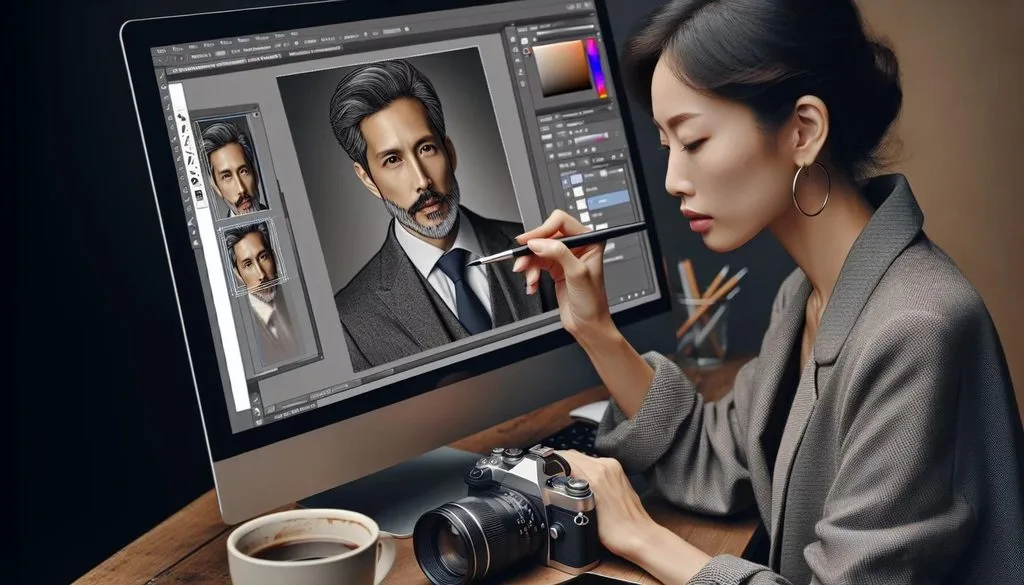
Top Beauty Retouching Services Compared (2026)
After reviewing dozens of providers across studio sites, marketplace listings, independent roundups like ExpertPhotography’s annual guide, and beauty retouching agency breakdowns, these are the names worth shortlisting. No single studio wins for everyone — match the provider to your workload.
| Provider | Best For | Starting Price | Turnaround | Standout Feature |
|---|---|---|---|---|
| Retouching Labs | High-end fashion & beauty | From $0.25 (basic); beauty tiers higher | 24h | Established 2009, wide service range, strong skin work |
| FixThePhoto | Diverse genres, one-off to bulk | From $2/image; high-end ~$12 | 24h | Free trial, public editor profiles, huge portfolio |
| BeEdits | Natural, texture-preserving beauty | $5/image | 24h | Explicit “no plastic skin” philosophy, 1 revision included |
| ClippingExpertAsia | Skincare brands, bulk beauty campaigns | $1.99–$5.99/image | 6–24h | Unlimited revisions, NDA, dedicated retoucher, 300K+ images |
| WeEdit.Photos | Portrait & wedding batches | Few $ per image | 24h | No subscription, no minimum order, 24/7 support |
| Ephotovn | High-end + product mix | Per-image, pay when happy | 24h | Unlimited revisions, work one-to-one with a single editor |
| Pixelz | E-commerce at scale | Credit/subscription | Fast | Standardized, consistent output for catalogs |
| Fiverr / Upwork freelancers | One-off hero images, flexible | $5–$100+/image; $15–150/hr | Varies | Direct contact, top-rated talent, variable quality |
| ShootDotEdit | Wedding & event galleries | Per image | Learns your style | Style matching across thousands of frames |
| Path (ex–Clipping Path India) | Cutouts, cleanup, volume | Credits | 6h | Portrait retouching is a sideline — use for product work |
A few honest caveats. Wedding specialists like ShootDotEdit are brilliant at cohesive gallery color but are not built for deep skin sculpting. Product giants like Pixelz and Path deliver uniformity at scale but feel rigid for creative portrait work. And marketplace freelancers on Fiverr range from $5 beginners to $100-per-image editorial artists — the rating and review count matter more than the headline price.
What Beauty Retouching Actually Costs in 2026
Pricing is the question everyone asks first, so here is a realistic range pulled from current studio price lists and industry cost guides:
| Service Tier | Typical Price / Image | What’s Included |
|---|---|---|
| Basic cleanup | $0.25 – $3 | Blemish removal, light smoothing, simple color correction |
| Professional beauty | $3 – $12 | Frequency separation, dodge & burn, eyes/teeth, hair cleanup, color grading |
| High-end editorial | $12 – $100+ | Full sculpting, body/fashion retouch, PSD layers, print-ready, art direction |
| Freelance hourly | $15 – $150/hr | Best for undefined, creative, or composite work |
Volume changes the math dramatically. Bulk discounts of 30–50% are common at 100+ images, and monthly retainers work out cheapest of all for agencies with steady flow. If you only need a handful of images, a per-image studio with no minimum is your friend — never sign a subscription for occasional work.
How to Judge a Beauty Retouch at 100% Zoom
This is the single most useful skill in this whole article, and it comes straight from how professional editors evaluate work. You do not need to trust a studio’s description of its own quality. You need its samples open at full size, and you check four places.
1. Pore structure. Either it is there or it is not. Frequency separation keeps pores; blur and smoothing sliders erase them. If the pores are gone, nothing else about the sample matters — walk away. If you want to understand why texture matters, our guide on how to smooth skin naturally walks through the difference.
2. Facial modelling. Look along the side of the nose, under the cheekbone, and along the jaw. Is there still shape? Evening out skin tone flattens the face; dodge & burn puts the dimension back. A studio that skips that second step delivers a face that is even but flat — like a cardboard cutout with good skin.
3. Transitions. Check the hairline, the jaw edge, and where skin meets fabric or jewelry. An over-generous mask shows itself here as a soft halo, a sudden change in texture, or a faint outline. This is where rushed work hides.
4. Eyes. The whites should be clean, not grey and not glowing. Catchlights should keep their real shape, and the iris should keep its detail. A quick tell: the whites of the eyes should be a touch brighter than the teeth, or the smile becomes the first thing anyone sees.
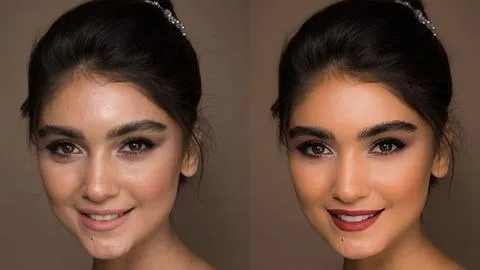
Open any studio’s before-and-after sample at 100% and run through those four checks. You will sort the good from the mediocre in about thirty seconds.
The Techniques the Pros Actually Use
When a studio says “high-end retouching,” it is usually talking about two specific techniques. Understanding them helps you ask the right questions and spot the studios that are faking it.
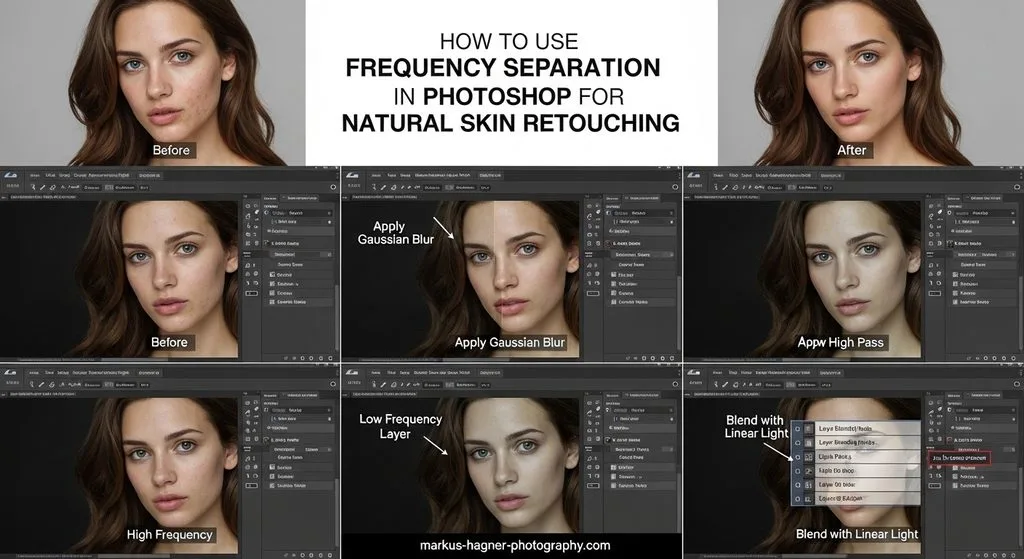
Frequency Separation
Frequency separation splits the image into two layers: a low-frequency layer holding color and tone (redness, blotches, shadows) and a high-frequency layer holding fine detail (pores, hair, skin grain). By separating them, a retoucher can smooth uneven tone on the low layer without touching the texture on the high layer. Adobe’s own guide to frequency separation in Photoshop walks through the workflow, and ClippingExpertAsia’s frequency separation tutorial covers the practical setup. The rule of thumb: if a studio cannot name this technique, it is not doing high-end work.
Dodge & Burn
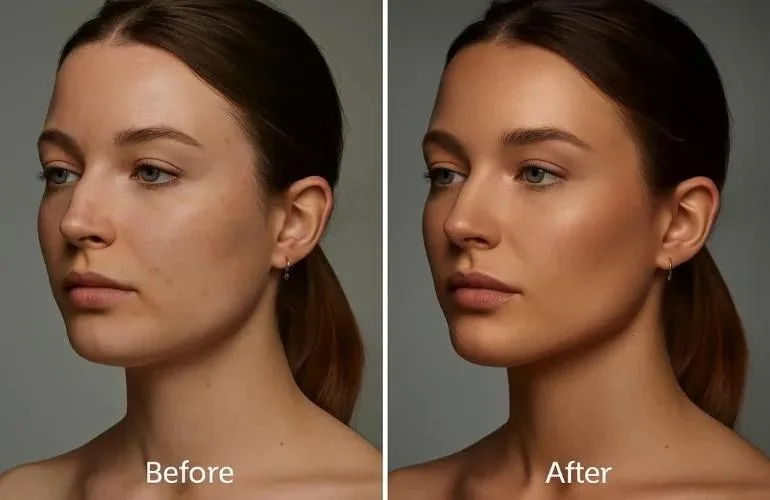
If frequency separation cleans the skin, dodge & burn sculpts it. On a soft-light gray layer, the retoucher paints white (dodge, to lighten) and black (burn, to darken) to rebuild volume along the cheekbones, nose, and jaw — exactly the dimension that smoothing removes. Impact Photography’s breakdown of frequency separation vs dodge & burn puts it well: professionals rarely choose one. They clean first, then sculpt. If you are ever trying to lift harsh face shadows yourself, dodge & burn is the same principle at home.
AI Retouching vs Human Retouchers in 2026
AI tools have gotten genuinely good, and the question is no longer “can AI do it?” but “which parts should AI do?” The data from head-to-head tests is pretty clear.
Where AI wins: speed and cost. An AI pass takes 5–10 seconds versus 8–20 minutes of manual retouch, and it handles routine jobs well — blemishes, face shine, teeth whitening, glasses glare, stray hairs, and consistency across group photos. For high-volume social content, an AI-first workflow with a human review step is hard to beat.
Where humans still win: high-end beauty and fashion, dodge & burn sculpting, body shaping, composites, and anything printed large. Industry comparisons from Color Experts International and Aftershoot both land on the same conclusion: AI is roughly 20x faster but averages lower quality on complex work, while human retouchers score near-perfect on preserving natural texture and brand consistency.
The smart setup for most studios in 2026 is hybrid: AI does the boring cleanup, a human does the sculpting and the final check. If a provider sells “AI retouching” at premium prices with no human in the loop, that is a red flag. If it sells human retouching but takes three days per image, it is probably not using AI where it helps.
How to Brief a Beauty Retoucher (and Get Exactly What You Want)
A retoucher can only execute the decisions you hand over. The best briefs are specific, and the worst briefs say “make it look good.” Here is what to include:
- Reference images. Send 2–3 examples of the level and style you want. A picture is worth a thousand revision rounds.
- Mark the areas you care about. Circle them on 100% crops rather than describing them in words. “Slightly less on the forehead, keep the mole on the left cheek” is the kind of note that gets a perfect first pass.
- State the final use. A frame going to print is checked more closely and needs more print resolution headroom than one destined for Instagram. If it is going on the web, mention the platform so the export matches the right image sizes.
- Name the makeup intent. A dewy highlight on the cheekbone is intentional; a retoucher who does not know that may matte it down. If a cosmetics product is the point of the image, say its color must stay exactly as shot.
- Send the best file you have. RAW files give retouchers far more latitude than a compressed JPEG, especially for exposure and color recovery.
A good test set, if you are auditioning a studio: one straightforward close-up, one with difficult skin, and one with hair against a busy background. The last two reveal the most.
Red Flags to Avoid
After reading through dozens of studio pages and buyer guides, these are the warning signs that consistently predict a bad experience:
- No free trial or test image. Every reputable studio offers a free sample. If it will not edit one image for you to judge, it is hiding something.
- “Unlimited everything” at $0.50 per image. Unlimited revisions at rock-bottom prices usually means the base quality is low enough that you will need them.
- Samples only shown as small thumbnails. If you cannot zoom a sample to 100%, assume the work does not hold up there.
- Vague answers to technique questions. Ask “how do you even skin tone without losing texture?” The answer should name frequency separation or a comparable approach specifically. Vagueness is an answer.
- No NDA or confidentiality policy. For beauty brands and celebrity work, your images are valuable. Confirm they are not reused in portfolios without permission.
- No human quality check. Pure automated pipelines deliver plastic skin on difficult images, every time.
Ethics, Transparency, and the Law
Beauty retouching exists in a real social context, and the conversation has moved well beyond “is it okay?” Countries are starting to regulate it. Norway amended its Marketing Control Act in 2021 to require a standardized disclosure tag on ads where body features have been digitally altered. Israel’s “Photoshop Law” (2013) was the world’s first, and France requires influencers to label retouched images or face fines. Mexico debated a similar labeling rule as recently as 2026, and the UK’s ASA has run full evidence reviews on digitally altered imagery in advertising.
What this means for you: if you run beauty or skincare advertising, disclose meaningful body reshaping. Keep freckles, moles, and skin markings unless the subject asks otherwise. Do not reshape faces by default. And if you ever wonder where the line is, our piece on editing ethics is a good starting point — the principles translate directly to commercial work.
The best studios bake this into their process. BeEdits, for instance, states plainly that it does not make skin completely smooth and that it is the wrong studio for an airbrushed brief. That kind of clarity is worth paying for.
How to Choose the Right Beauty Retouching Service — Step by Step
- Decide your tier first. Bulk social content → basic. Brand campaigns and portfolios → professional. Covers and hero shots → high-end. This single decision eliminates 80% of the list.
- Shortlist 3–5 studios that publish clear pricing and offer a free trial. Use comparison roundups like ExpertPhotography’s 22 best photo editing services to find candidates, and browse marketplace options on Fiverr’s beauty retouch category for one-off specialist work.
- Run the 100% test on each studio’s samples using the four checks above.
- Send the same test image to your top two or three. A free trial tells you more than any price list — it is the only way to find out whether a studio can match your style.
- Check revision policy, turnaround, and file security before you commit. Ask about NDA, dedicated retoucher assignment, and whether PSD source files are included.
- Start small. Send a batch of 10–20 images before committing to a full campaign or retainer.
Frequently Asked Questions
How long does beauty retouching take?
Basic cleanup takes 10–20 minutes per image. A professional beauty retouch with frequency separation and dodge & burn takes 30–90 minutes. High-end editorial work on a hero image can take several hours. Delivery times from studios range from 6 hours (express) to 48 hours standard.
Will retouching make my photos look unnatural?
Not if the studio preserves texture. Ask for frequency separation and check samples at 100% before ordering. You can also share a style reference so the studio matches your preferred level of smoothing. The unnatural look comes from blur filters, not from professional retouching.
What file formats should I send?
Send RAW, TIFF, or high-resolution JPEG/PNG. PSD files with layers are a bonus. The more data the file holds, the more a retoucher can recover — especially for exposure, color, and shadow detail.
Do beauty retouching services offer revisions?
Most professional-tier studios include at least one revision; budget studios may cap at one or charge extra. A handful (including ClippingExpertAsia) offer unlimited revisions, which is valuable while calibrating a new studio relationship.
Can I get a consistent style across a big campaign?
Yes — if the studio assigns you a dedicated retoucher or follows a style guide. Ask for this explicitly. Consistency across hundreds of images is the difference between a campaign and a collage, and it is where dedicated-account structures earn their fee.
Is beauty retouching expensive?
It ranges from about $2 to over $100 per image, so “expensive” depends entirely on the tier. For most professional use, the $3–$12 band delivers excellent value. Bulk discounts of 30–50% apply at volume, and retainers are cheapest for steady work.
Should I use AI or a human retoucher?
Use AI for routine, high-volume cleanup where speed matters most. Use a human — or a hybrid AI-plus-human pipeline — for anything where skin texture, brand consistency, or print quality matters. In 2026, the best providers use both.
Are my photos kept confidential?
Reputable studios offer NDAs and delete files after delivery (commonly 30 days). Always confirm before sending unreleased campaign imagery, and never send embargoed work to a studio that cannot promise confidentiality.
Final Thoughts
Beauty retouching is one of those services where the cheap option costs more in the long run — in re-edits, missed deadlines, and skin that looks like plastic. The good news is that choosing well is not complicated: know your tier, inspect samples at 100%, run a free trial, and start small. The best beauty retouching service for you is the one whose work you cannot see — the one that makes the person look like their best self, pores and all.