What Is ISO in Photography? The Complete Guide to Camera ISO (Meaning, Settings & Noise)
TL;DR:
ISO is your camera’s brightness-amplification setting. Lower numbers (ISO 100–200) give the cleanest files; higher numbers (ISO 1600+) brighten low-light shots but add visible noise. Stay at base ISO on a tripod, raise ISO only to keep your shutter speed fast enough for sharpness, and clean up leftover grain in post. A sharp noisy photo always beats a clean blurry one.
1. What Does ISO Mean, Exactly?
If you’ve ever wondered what does ISO mean, here’s the short answer: ISO is a number that tells you how brightly your camera renders the light it captured. A low ISO like 100 produces a darker, cleaner file from the same amount of light; a high ISO like 3200 brightens that same light so you can shoot in dim conditions.
The letters themselves stand for the International Organization for Standardization — the same global body that standardizes everything from shipping containers to film speed. Back in the film era, each roll had a fixed “speed” rating (ISO 100, 400, 800…) describing how sensitive its chemical emulsion was to light. Digital cameras inherited the numbering system so the exposure math stayed familiar, even though the underlying mechanism changed completely. Nikon’s own guide and Adobe’s photography hub both walk through this film-to-digital lineage if you want the official version.
One small detail most beginners miss: “ISO” isn’t an acronym you pronounce letter-by-letter in the field. Photographers say “eye-so” as a word. You’ll hear “set your eye-so to 800” far more often than “I-S-O.”
2. What Is ISO on a Camera? How It Actually Works
Here’s the sentence that changes everything: your camera’s sensor does not get more sensitive when you raise ISO. Not one bit. The sensor has a single, fixed physical sensitivity. What ISO changes is how strongly the camera amplifies the electrical signal the sensor already recorded before turning it into a picture.
Think of it like the volume knob on a radio. Turning up the volume makes a quiet station louder — but it doesn’t make the broadcast any clearer. The background hiss gets louder right along with the music. That hiss, in a photo, is what we call digital noise or grain.
So the honest answer to what is ISO on a camera is: it’s a brightness boost applied after the exposure. Aperture and shutter speed decide how much light actually reaches the sensor. ISO decides how brightly that captured light is displayed. That distinction sounds academic, but it rewrites the rulebook for low-light shooting — we’ll come back to it.
3. ISO and the Exposure Triangle
ISO is the third corner of the exposure triangle, alongside aperture and shutter speed. But it plays a fundamentally different role from the other two, and treating all three as interchangeable is the most common beginner mistake.
| Setting | What it actually controls | The price you pay for pushing it |
|---|---|---|
| Aperture (f/1.4 – f/22) | How wide the lens opens — how much light enters | Depth of field (wide = blurry background) |
| Shutter speed (1/4000s – 30s+) | How long the sensor sees light | Motion blur / camera shake (slow = blur) |
| ISO (100 – 102400+) | How much the captured signal is brightened | Digital noise + reduced dynamic range |
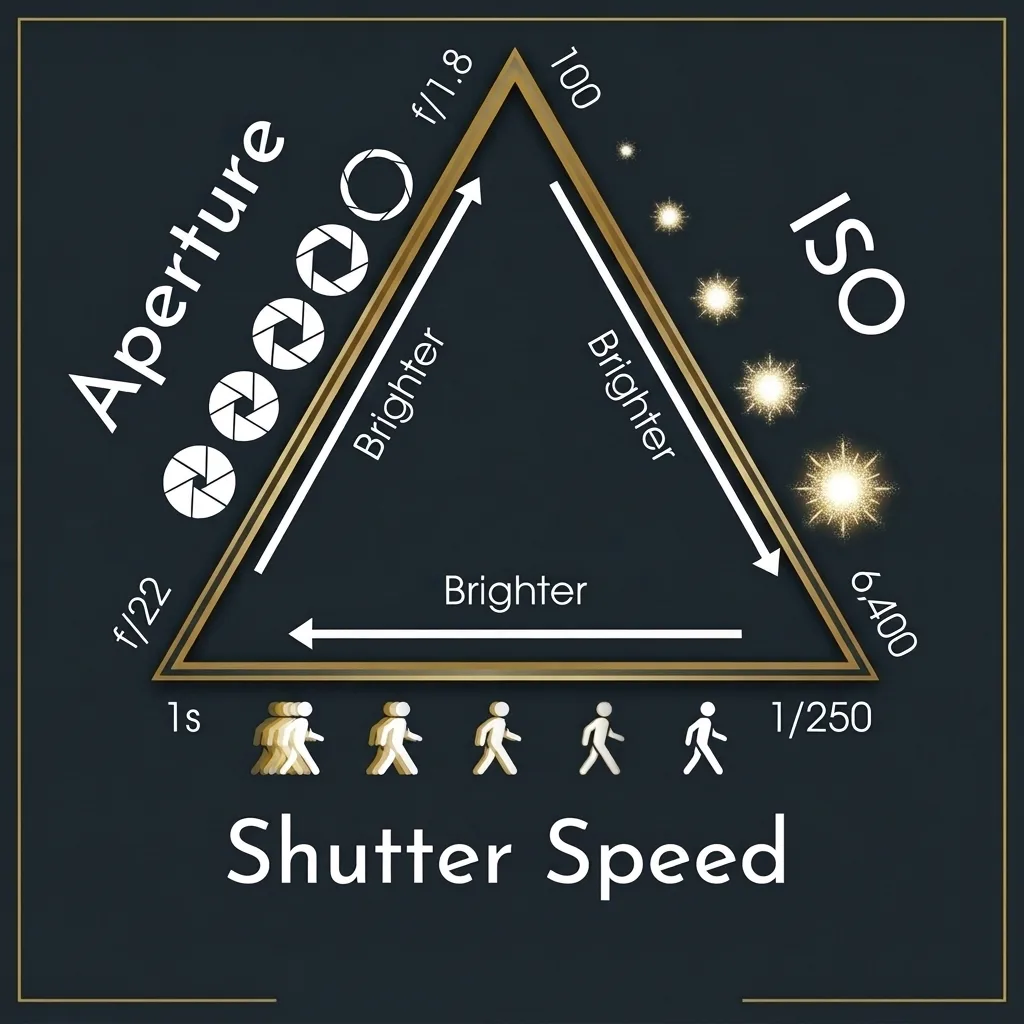
Aperture and shutter speed change your exposure — the quantity of light hitting the sensor. ISO changes the brightness of the file you get from that exposure. In practice, most working photographers set aperture and shutter speed first for creative effect (depth of field and motion), then use ISO as the final dial to correct brightness. ISO is the cleanup hitter, not the leadoff batter.
4. Standard ISO Values and What Each One Is For
ISO scales in doubling steps. Each time you double the number (100 → 200 → 400 → 800…), the image gets exactly one stop brighter — the same as halving your shutter speed or opening the aperture by one full f-stop. Most cameras also offer third-stop increments in between (125, 160, 250, 320, 500, 640…), which are perfectly fine to use.
| ISO range | Noise level (modern camera) | Best used for |
|---|---|---|
| 100–200 (base) | Effectively zero | Bright daylight, studio flash, tripod landscapes, product shots |
| 400–800 | Barely visible | Overcast days, shade, golden hour, indoor window light |
| 1600–3200 | Mild, easily fixed | Indoor events, dim restaurants, dusk, sports under lights |
| 6400–12800 | Moderate, needs NR | Night handheld, dark receptions, indoor sports, concerts |
| 25600+ (extended) | Heavy, emergency only | Pitch-dark situations where getting the shot matters more than quality |
These are starting points, not laws. A 2026 full-frame camera at ISO 6400 is cleaner than a 2010 DSLR at ISO 800 was. The only number that truly matters is the one your camera produces at a quality you accept.
5. Low ISO vs High ISO: Where Noise Really Comes From
Everyone tells you “high ISO causes noise.” That’s the convenient half-truth. The fuller picture is this: noise mostly comes from capturing too little light, not from the ISO number itself.
Light doesn’t arrive at the sensor as a smooth flow. It arrives as individual photons landing randomly, like raindrops on a pavement. When lots of photons land, that randomness is tiny relative to the whole — you get a clean image. When very few land, the randomness becomes a large fraction of the total signal, and it shows up as speckled grain. The camera’s own electronics add a little noise too, which matters most in deep shadows. Raising ISO brightens everything signal and noise together. You only reach for high ISO when light is scarce, so high ISO and noise always show up together. But high ISO is the symptom; scarce light is the cause.
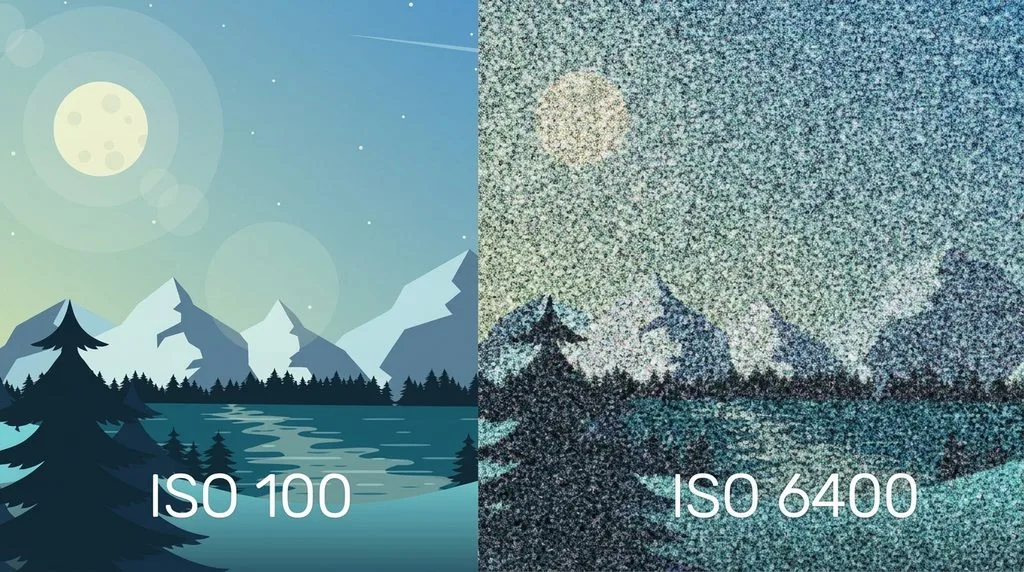
You can prove it to yourself in five minutes. Take one shot at ISO 3200, correctly exposed. Take the same shot at ISO 100 with identical aperture and shutter speed (it’ll come out about five stops too dark), then brighten it five stops in your editor. On most modern cameras, the second file won’t be cleaner — it’ll look the same or worse. This is why a correctly exposed ISO 3200 frame nearly always beats an underexposed ISO 800 frame that you try to rescue later. If you do end up with a dark file, here’s how to fix underexposed photos without multiplying the noise.
The practical rule that follows is more useful than “keep your ISO low”: capture as much light as your shot allows, then use ISO to make up the rest. A wider aperture or a slower shutter speed buys you real quality; a lower ISO number alone buys you nothing if it means a darker file.
High ISO also costs you dynamic range — each step up leaves less headroom before bright highlights clip to pure white. That’s the second reason base ISO is the default for high-contrast scenes like sunsets.
6. Base ISO, Native ISO, Extended ISO, and Dual Native ISO
You’ll see these terms in menus and forums. Here’s what they actually mean, in plain English.
- Base ISO — the lowest standard setting your sensor offers, usually ISO 100 (some Nikons go to 64, some Fujifilms start at 125–200). This is where the sensor runs with no extra amplification, giving you the widest dynamic range and the cleanest possible file. Fstoppers has a deep dive on why base ISO is the quality peak.
- Native ISO range — all the values the sensor can produce through its real analog amplification circuits, as opposed to digital trickery. For most cameras that’s roughly 100–25600.
- Extended ISO (L/Lo and H/Hi) — values outside the native range, achieved by digitally pushing or pulling the signal in processing. A “Lo” setting like ISO 50 costs you highlight headroom (use an ND filter instead for long exposures). A “Hi” setting like ISO 102400 is heavily amplified and very noisy — keep it as an emergency option.
- Dual Native ISO (Dual Gain) — found on many cinema-oriented and newer stills cameras (often around ISO 100 and ISO 800). The sensor literally switches to a second, higher-gain readout circuit at that second base point. Just above the second native value, images can be cleaner than at the setting just below it. If your camera has this, look up the exact value and use it as a low-light floor. ExpertPhotography covers how it works with model examples.
7. ISO Invariance: Raise ISO In-Camera or Brighten Later?
Many modern sensors are ISO invariant (or “ISOless”) above a certain point. That means raising ISO in-camera gives you almost the same result as shooting at a lower ISO and brightening the file in post. There’s no free lunch — the noise is determined by how much light you captured — but there’s also no penalty for protecting highlights by shooting a little darker and lifting later.
This matters in high-contrast night scenes. If a bright streetlamp or moon would blow out at ISO 3200, you can shoot at ISO 800 to preserve those highlights and brighten the shadows in editing with little quality penalty. Test your own camera before relying on it; sensors differ, and CaptureLandscapes’ ISO guide shows how to run the exact comparison test.
8. Sensor Size and High ISO Performance
All else equal, a bigger sensor collects more total light, and more light means less noise. At the same ISO and shutter speed, a full-frame sensor gathers roughly 2.5× more light than APS-C and about 4× more than Micro Four Thirds. That translates directly into cleaner high-ISO files and more recoverable dynamic range.
| Sensor format | Approx. area | Comfortable high-ISO ceiling (modern bodies) |
|---|---|---|
| Full frame (36×24mm) | ~864 mm² | ISO 6400–12800, sometimes 25600 |
| APS-C (~24×16mm) | ~330–370 mm² | ISO 3200–6400 |
| Micro Four Thirds (17.3×13mm) | ~225 mm² | ISO 1600–3200 |
| 1-inch / phone-type | ~116 mm² or less | ISO 400–800 before noise gets heavy |
This is why low-light wedding and event photographers reach for full-frame bodies, and why the highest-resolution cameras tend to pair big sensors with careful noise handling. It’s also why you can’t directly compare ISO numbers across formats — ISO 3200 on a full-frame body and ISO 3200 on a 1-inch camera are very different visual experiences.
9. Choosing ISO for Every Shooting Situation
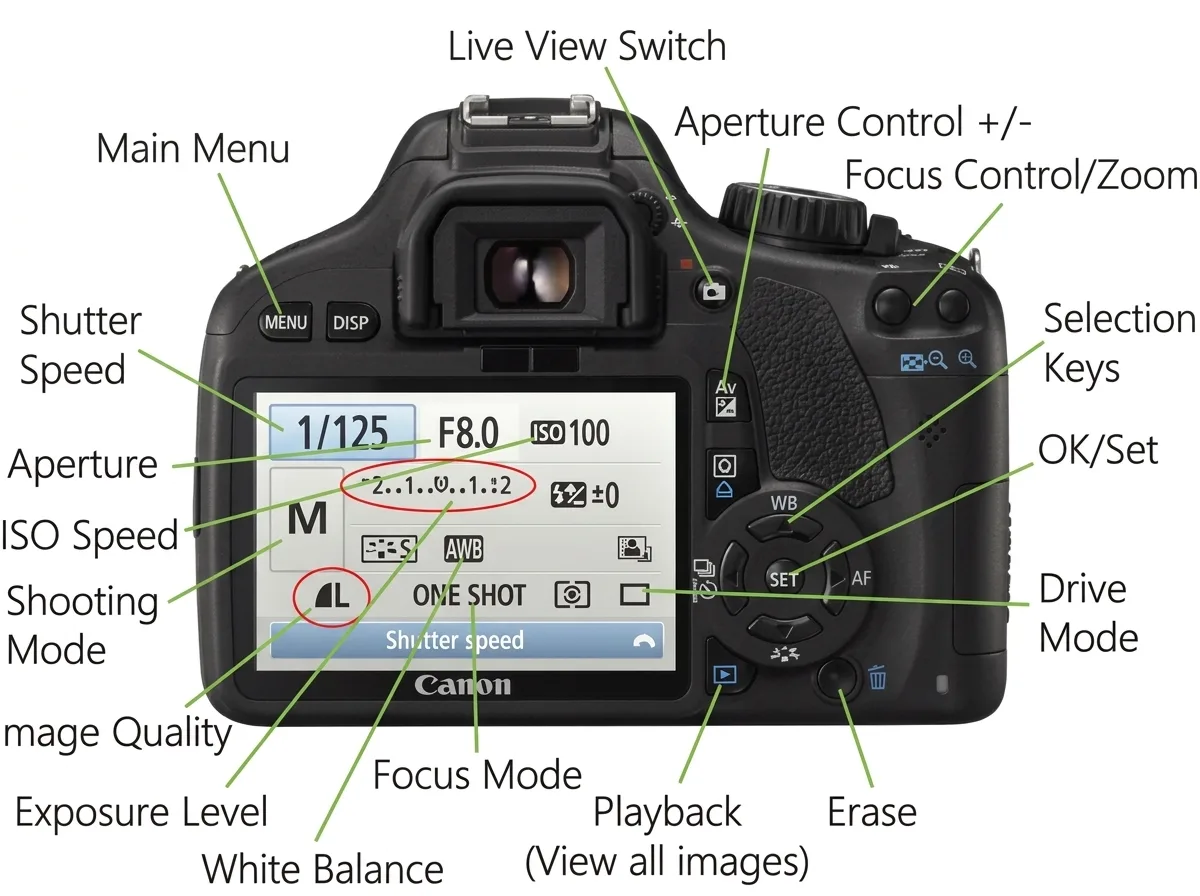
There is no single “best ISO.” The right value depends on whether the camera is supported and whether anything in the frame is moving. Here’s how working photographers actually decide.
| Situation | Typical ISO | What sets the limit |
|---|---|---|
| Tripod, static scene (landscape, architecture) | Base (64–200) | Nothing — keep it clean |
| Long exposure (water, clouds) | Base + ND filter | Use ND, not extended low ISO |
| Handheld in good light | 100–400 | Shutter speed for sharpness |
| Handheld at blue hour / indoors | 800–3200 | Shutter speed for sharpness |
| Action, wildlife, sports | 400–3200 | Shutter speed to freeze motion |
| Weddings / events indoors | 1600–6400 | Ambient light + fast glass |
| Milky Way / astro | 3200–6400 | Star trailing limits shutter speed |
| Northern lights | 1600–3200 | Aurora movement demands short exposures |
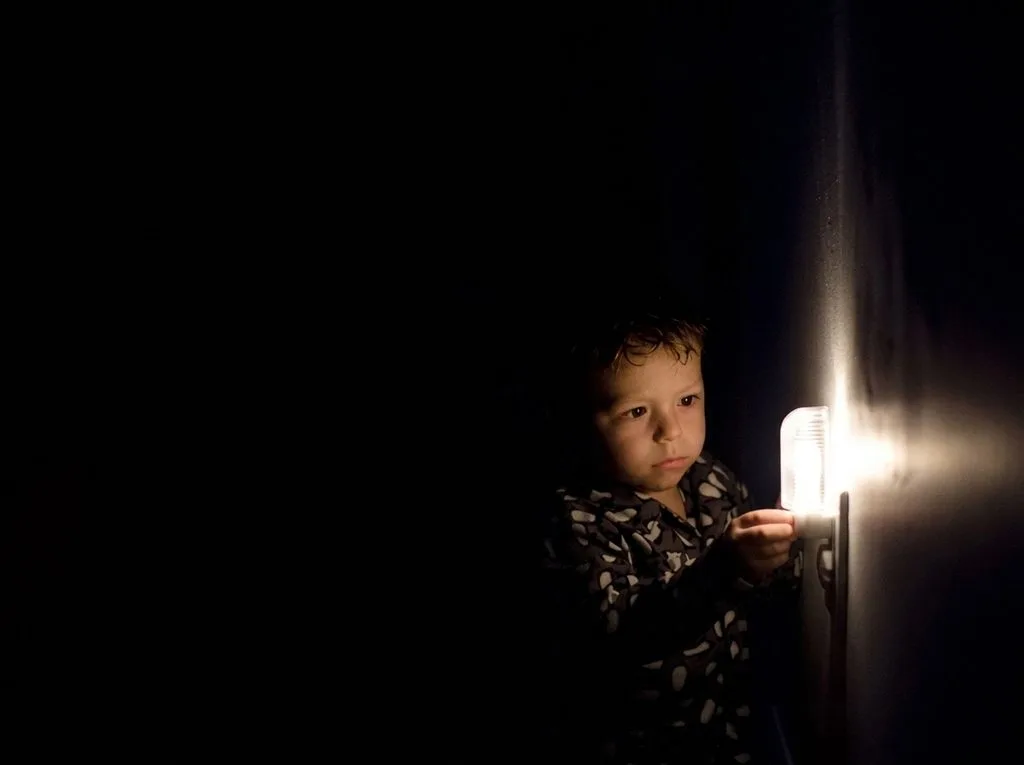
The handheld rule of thumb: keep your shutter speed at roughly 1 ÷ focal length (1/50s at 50mm, 1/200s at 200mm), a bit slower if you have stabilization. Set your aperture first, set that minimum shutter speed, then raise ISO until the exposure looks right. Repeat after me: a slightly noisy sharp photo is always better than a clean blurry one.
10. Auto ISO: When to Use It (and the One Setting You Must Change)
Auto ISO lets the camera pick the ISO while you control aperture and shutter speed. For tripod work, most photographers leave it off — a slow shutter speed costs nothing on a tripod, so there’s no reason to let the camera raise ISO and sacrifice quality.
But for wildlife, street, events, or any fast-changing light where missing the moment is the real risk, Auto ISO is genuinely excellent — if you set a maximum ceiling in the menu. Pick the highest ISO you’re willing to accept from your camera (say 6400 on full-frame, 3200 on APS-C), set a minimum shutter speed if your camera offers it, and shoot. The camera will never push past your quality floor, and you stop fiddling with dials while the light changes.
11. Five ISO Myths That Won’t Die
- “High ISO causes noise.” Mostly no — scarce light causes noise; high ISO just reveals it. Underexposing at low ISO and brightening later is usually worse.
- “You should always use the lowest ISO possible.” Only if it doesn’t force a shutter speed so slow that you get camera shake. Sharpness beats cleanliness.
- “ISO 100 is always the base.” No — check your manual. Some cameras base at 64, 125, or 200.
- “Extended high ISO (H1, H2) is just as good as native.” No — it’s digital push; expect noticeably more noise and banding.
- “You can’t recover a noisy photo.” Modern AI denoise tools are borderline magical. Grain is fixable; blur and missed moments are not.
12. Reducing Noise From High-ISO Photos
Even with perfect technique, some shots will be noisy. Here’s the order that actually works.
In the field:
- Shoot RAW. A RAW file holds 2–4 stops more data than a JPEG, which gives denoising software far more signal to work with. If you’re still on the fence, here’s the full RAW vs JPEG breakdown.
- Expose as brightly as you can without clipping highlights (“expose to the right” on the histogram). Brighter capture = less shadow noise to lift later.
- Stabilize. A tripod, faster lens, or off-camera flash all add real light — the only true noise cure.
- Frame-stack for static scenes. Take 4–8 identical exposures on a tripod and average them; noise is random and cancels out, roughly halving visible noise every four frames.
In post-processing:
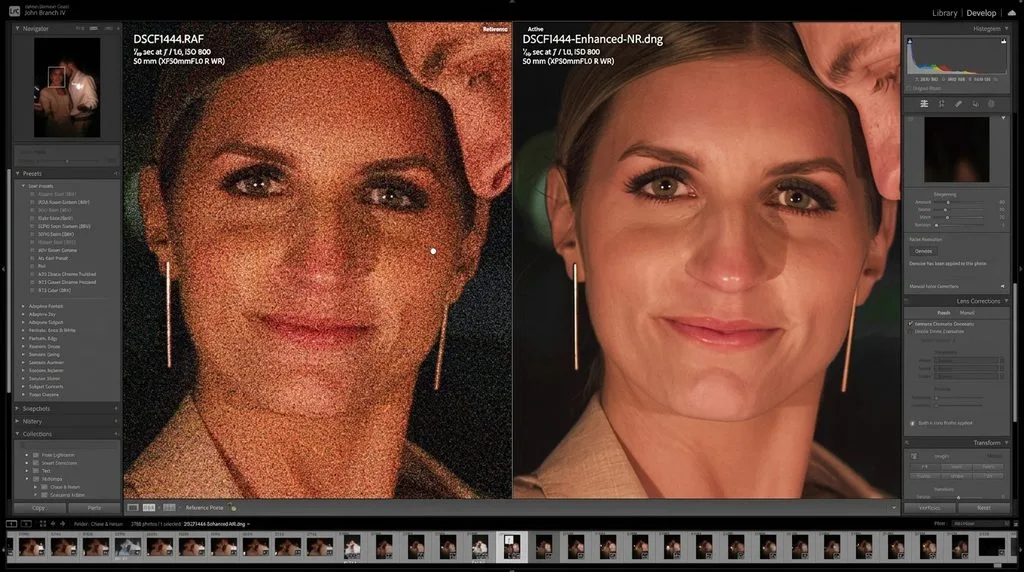
- Start with your editor’s built-in luminance noise reduction (Lightroom’s Denoise / Adobe Camera Raw are excellent).
- For heavy noise, AI-powered tools preserve detail that traditional NR smears. We’ve ranked the best AI upscaler tools that also handle denoising, and these noise reduction tips walk through the workflow step by step.
- Apply a little sharpening after denoise to restore crispness — here’s how to sharpen an image without creating halos.
- Don’t overdo it. A little fine grain looks natural; plastic-smooth skin does not. If you’ve pushed a file hard, our guide to fix grainy photos covers every trick from masking to channel-specific NR.
13. ISO in Film vs Digital: Why the Numbers Feel the Same but Aren’t
On film, ISO described the emulsion’s actual chemistry — ISO 800 film literally had larger, more light-reactive silver halide crystals than ISO 100 film, and that’s why it was grainier. You bought one speed per roll and were stuck with it for 36 frames.
On digital, the sensor never changes; only the amplification does. That’s why you can switch ISO from shot to shot with zero penalty, and why “ISO 400” on a 2026 camera looks nothing like ISO 400 film. The numbering was kept for continuity so your exposure math (sunny 16, the exposure triangle) still works — but the quality ceiling has moved up by roughly four stops in twenty years. If you enjoy the film look, by all means add grain intentionally in post; just don’t confuse it with the noise you get from a dark high-ISO file.
14. Pro Tips and Quick ISO Cheat Sheet
- Memorize your camera’s noise floor. Spend one evening shooting the same scene at ISO 100, 400, 800, 1600, 3200, 6400. View at 100%. The highest number you can live with becomes your Auto ISO ceiling. This is worth more than any chart.
- Check the histogram, not the LCD. The back screen brightens previews; a “dark-looking” chimp may be perfectly exposed. Trust the histogram.
- For night skies, start at ISO 3200, f/2.8, and the longest shutter speed that doesn’t trail stars (roughly 500 ÷ focal length).
- For flash/studio, stay at base ISO (100–200) — you have all the light you need.
- When in doubt, raise ISO. Modern sensors + AI denoise mean noise is a fixable editing problem; blur and missed moments are permanent.
15. Frequently Asked Questions
What does ISO stand for in photography?
ISO stands for the International Organization for Standardization, which established the film-speed rating system. In digital photography, ISO controls how strongly the camera amplifies the signal captured by the sensor.
Is it better to use high ISO or brighten the photo later?
On most modern cameras, the results can be similar, but the cleaner option depends on the sensor and exposure settings. Raising ISO in-camera can produce cleaner results in some situations, while brightening later can help protect highlights. Capture as much real light as possible first.
What ISO should I use indoors?
Start around ISO 800–1600 and adjust until your shutter speed is fast enough to avoid blur. Try at least 1/60s for relatively stationary people and 1/250s or faster for active children. ISO 3200 can still produce usable results on many full-frame cameras.
Does higher ISO make photos blurry?
No. High ISO primarily increases image noise and may reduce fine detail, but it allows you to use faster shutter speeds in low light. A sharp, noisy photo is often better than a clean but blurry one.
What is the best ISO for outdoor daylight?
Use your camera’s base ISO, commonly ISO 100, though some cameras offer ISO 64 or start at ISO 200. In bright daylight, a low ISO generally provides the best image quality when your shutter speed and aperture allow it.
Should I use Auto ISO?
Auto ISO is useful for action, wildlife, street photography, and changing light. Set a maximum ISO you’re comfortable with. For tripod-based landscapes or architecture, base ISO is usually preferable when a slower shutter speed is practical.
Why are my high-ISO photos so noisy?
Underexposure can make noise more noticeable, especially when you brighten shadows during editing. Check your histogram, protect highlights, shoot RAW when possible, and apply noise reduction in post-processing. For more help, read our step-by-step guide to fixing grainy photos.
Final Thoughts
If you remember one sentence from this whole guide, make it this: ISO doesn’t create light — it only brightens what you’ve already captured. Get as much real light on the sensor as your composition allows with aperture and shutter speed, sit at base ISO whenever the camera is on a tripod, and raise ISO without guilt when sharpness or the moment depends on it. With today’s sensors and AI denoise, ISO 3200 is not a compromise — it’s a perfectly normal, usable setting. Go test your own camera’s noise floor tonight, and you’ll stop worrying about ISO forever.