Google Photos vs iCloud: Which Should You Use for Your Photos in 2026?
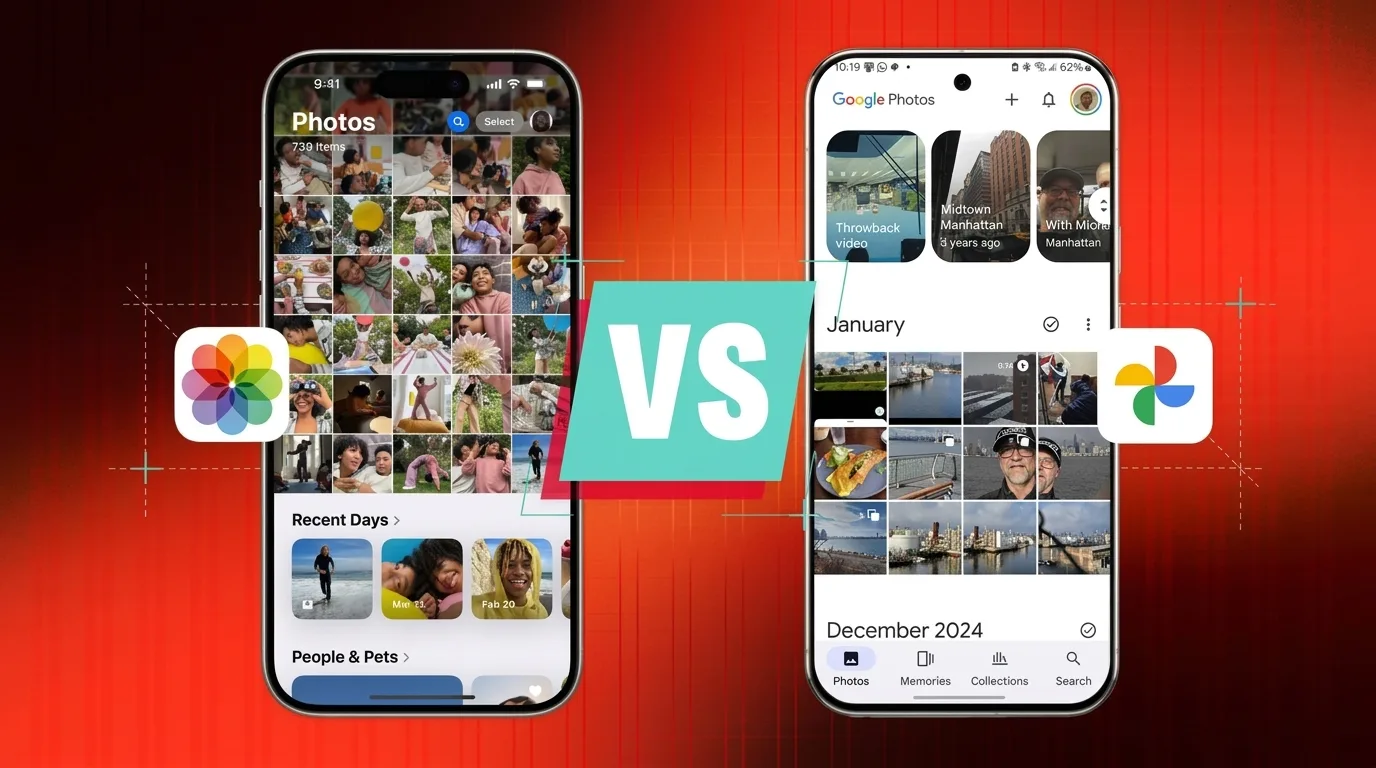
Short answer: Pick iCloud Photos if you live only in Apple gear and want full-resolution originals plus the strongest privacy option. Pick Google Photos if you’re on Android or a mixed-platform household, or if you want the smartest search and AI editing tools. Both are excellent — the real difference comes down to ecosystem, sync philosophy, and how much you value AI. Here’s the full, up-to-date breakdown.
First, let’s get the names straight
Before we compare anything, let’s untangle three terms people constantly mix up. “iCloud” and “iCloud Photos” are not the same thing.
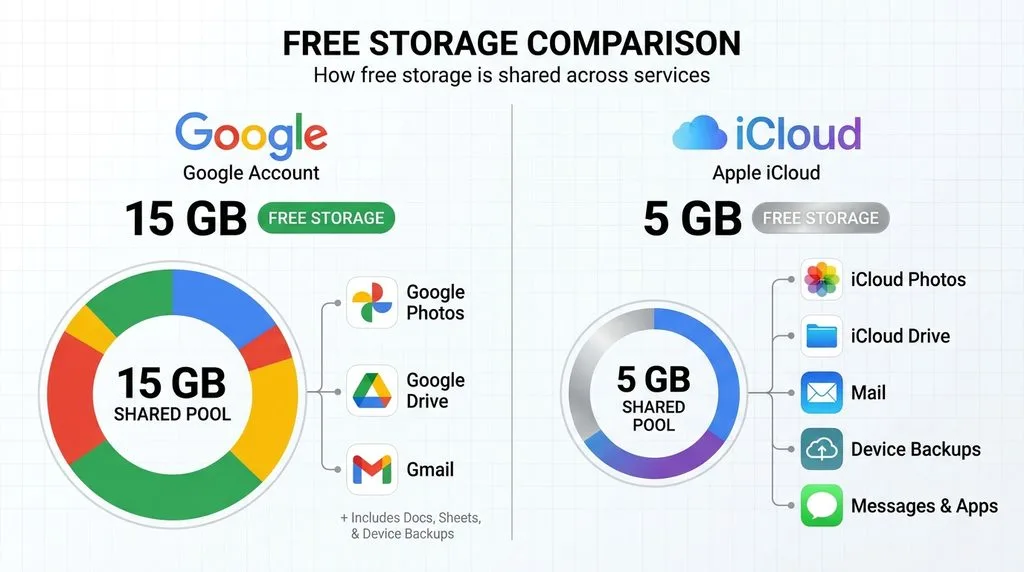
iCloud is Apple’s umbrella cloud service — device backups, iCloud Drive, Mail, notes, app data, and your photos. Every Apple ID gets 5 GB shared across all of it. iCloud Photos is the specific feature that syncs your photo library across Apple devices; it lives inside that 5 GB bucket and is what we’re comparing here. iCloud+ is the paid upgrade that adds storage plus perks like Private Relay, Hide My Email, and HomeKit Secure Video.
Google Photos is a standalone photo library. It draws from your 15 GB free Google storage, shared with Gmail and Drive. Paid upgrades are sold as Google One — and in 2026, Google One is no longer just storage, which brings us to pricing.
Pricing in 2026: the reset most articles got wrong
Here’s the thing almost every comparison article gets wrong this year: Google quietly rebranded its upper storage tiers into AI subscriptions in 2026. You’re not just buying gigabytes anymore — you’re buying Gemini access, Veo video generation, Deep Research, and even YouTube Premium Lite on the higher tiers. If you only want storage, the math looks very different than it did a year ago.
Google One (US, 2026)
| Tier | Storage | Monthly | Annual | What you get |
|---|---|---|---|---|
| Free | 15 GB | $0 | — | Shared with Gmail + Drive |
| Basic | 100 GB | $1.99 | $19.99 | Storage + family sharing |
| Standard | 200 GB | $2.99 | $29.99 | + 3% Google Store credit |
| AI Plus | 400 GB | $4.99 | — | Entry AI tier (Gemini access) |
| AI Plus | 2 TB | $9.99 | $99.99 | Higher Gemini limits |
| AI Pro | 5 TB | $19.99 | — | 4× Gemini limits, Gemini 4 Argon, Deep Research |
| AI Ultra | 20 TB | $99.99 | — (monthly only) | Launched May 2026, 5× Pro limits |
| AI Ultra | up to 30 TB | from $199.99 | — | Top tier, pricing varies |
A couple of notes here. The 400 GB AI Plus tier dropped from $7.99 to $4.99 in June 2026, so if you saw an older price, that’s why. And there is no 1 TB tier — ignore any article that says otherwise. You can confirm current Google One plans directly. Google AI Pro is available for $19.99 per month or $199.99 per year on the current US plan listing. Billing options and prices can change, so check Google One’s official pricing page before publishing.
iCloud+ (US, official 2026 pricing)
Apple’s lineup is simpler and hasn’t changed in a while. It’s also monthly billing only — there is no annual discount, which is worth remembering if you like to prepay.
| Tier | Storage | Monthly | Notes |
|---|---|---|---|
| Free | 5 GB | $0 | Shared with backups, Drive, Mail |
| iCloud+ | 50 GB | $0.99 | + Private Relay, Hide My Email, 1 HomeKit camera |
| iCloud+ | 200 GB | $2.99 | Up to 5 HomeKit cameras |
| iCloud+ | 2 TB | $9.99 | Unlimited HomeKit cameras |
| iCloud+ | 6 TB | $29.99 | — |
| iCloud+ | 12 TB | $59.99 | — |
Again, ignore any source that tells you 2 TB is $19.99 — it’s $9.99, matching Google’s 2 TB tier dollar-for-dollar. You can verify the official iCloud+ lineup on Apple’s site. Both services let you share your plan with up to five other people (six total) at no extra cost.
The real cost-per-GB picture
At 200 GB, both charge $2.99. At 2 TB, both charge $9.99 — but Google’s 2 TB now bundles Gemini AI, while Apple’s is pure storage plus iCloud+ perks. Above 2 TB, Google pushes you into AI Pro ($19.99 for 5 TB) and AI Ultra ($99.99 for 20 TB), while Apple scales more linearly to 12 TB at $59.99. If you only want storage and won’t use Gemini, Apple’s upper tiers are the better deal. If you’d use Gemini anyway, Google’s bundle can be a bargain. One grandfathered footnote: original 2016 Pixel owners still get unlimited original-quality uploads, and Pixel 2–5 owners get unlimited compressed uploads. Pixel 5a and newer have no perks.
The sync philosophy: the difference that actually bites
This is the single most important distinction between the two services, and it’s the one most articles gloss over. They treat the cloud in fundamentally different ways, and misunderstanding it can cost you photos.
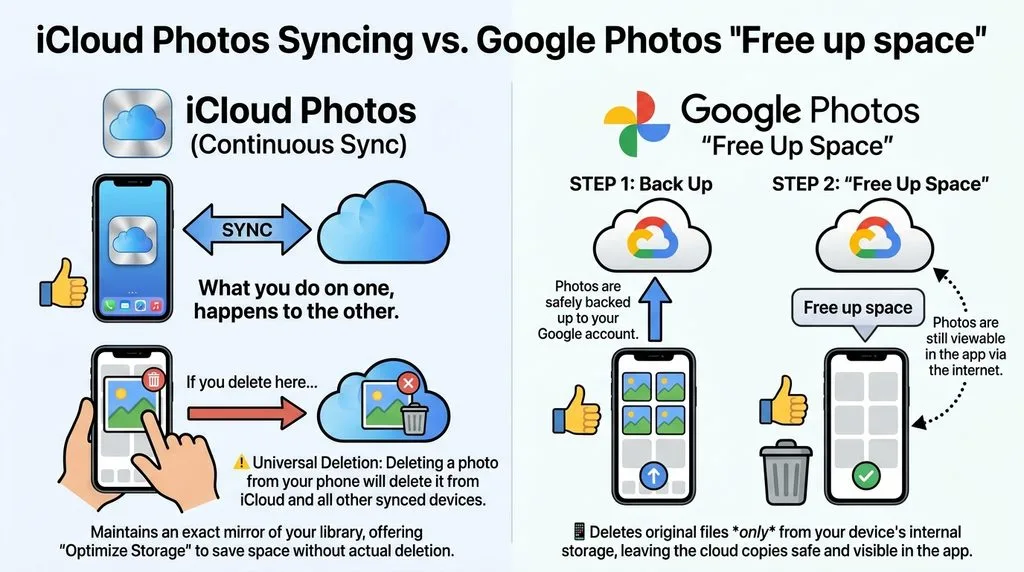
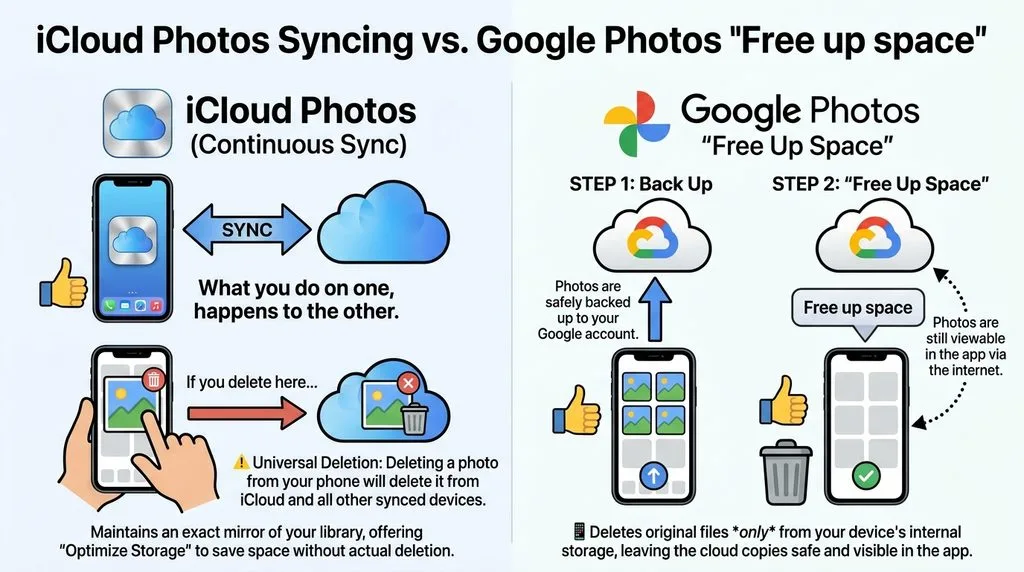
iCloud Photos treats the cloud as a mirror. Every device shows the same library, and a deletion on any device deletes the photo from iCloud and every other device (after the 30-day Recently Deleted grace period). There’s no “I’ll just remove it from my phone to save space” — if you delete it, it’s gone everywhere. To save device space, you turn on “Optimize Storage,” which keeps small versions on your phone and full originals in the cloud, but the library still mirrors across devices.
Google Photos offers a different way to manage storage. Once your photos are safely backed up, you can use “Free up space” to remove local copies from your phone while keeping them in your Google Photos library. However, deleting a photo through Google Photos’ Delete or Move to trash option can remove it from your library and other devices with backup enabled. Always confirm that your photos are backed up before removing local copies.
Why does this matter? If you switch from Google to iCloud and “clean up” your phone by deleting photos, you’ll delete them everywhere. If you’re used to iCloud’s mirror and expect Google to sync deletions globally, a photo may linger on another device. Neither is wrong — they’re different contracts. Pick the one that matches how you think about your library.
Quality, formats, and what counts against your quota
Upload quality
Google Photos gives you a choice: Original quality (full resolution, counts against your quota) or Storage saver (compresses photos to max 16 MP and video to 1080p, also counts against quota since June 2021). Storage saver used to be free and unlimited; that era is over. If you’re considering compression to stretch your storage, read up on how to compress images without visible quality loss — Google’s algorithm is quite good, but 16 MP is a real cap if you shoot high-res.
iCloud Photos has no compression option. It always stores your originals at full resolution in the cloud. “Optimize Storage” only downsizes the copies kept on your device; the cloud version is untouched. If you shoot in HEIC (Apple’s default) and want to understand the space savings, our HEIC vs JPEG breakdown explains why Apple’s format is so efficient.
Supported formats
Both handle JPEG, HEIC/HEIF, PNG, GIF, and most RAW files from Canon, Nikon, Sony, and others. Google also supports WebP and AVIF; Apple supports TIFF. For video, both handle MP4 and MOV, with Google supporting a wider range including MKV and MTS. If you’re a RAW shooter weighing RAW vs JPEG, both store RAW originals, though Google caps photo uploads at 200 MB (~200 MP) and video at 10 GB. Apple publishes no per-file cap for Photos, bounded in practice by iCloud Drive’s 50 GB limit.
What actually eats your free storage
This is where the free-tier comparison gets honest. Google’s 15 GB sounds generous, but it’s shared with Gmail (including every attachment you’ve ever received) and Google Drive. Apple’s 5 GB is smaller on paper and shared with full device backups — if you back up your iPhone to iCloud, your photos may get almost no room. Most people hit the wall on both within months. You can manage Google Photos storage with Google’s built-in tools; Apple offers similar review-and-delete utilities in Settings.
Search & organization: who finds your photos faster?
This is Google’s home turf, and in 2026 the gap is wider than ever. Search is the feature Google has invested in longest, and it shows.
Google Photos has run on-server machine learning for years. It recognizes faces, places, objects, and text, and lets you search in plain English — “beach photos from 2019” or “photos of Mom with the dog.” In late 2025, Google rolled out Ask Photos, a Gemini-powered conversational search that expanded to over 100 countries and 17 new languages. You can ask it things like “show me my best sunset photos” and it will reason across your entire library. It works on any device that runs the Google Photos app — no special hardware required.
Apple’s Photos app also has ML search and face grouping, but it runs on-device for privacy, limited by your device’s processing power. Apple’s advanced “Visual Intelligence” AI search, the closest equivalent to Ask Photos, only works on Apple Intelligence devices: iPhone 15 Pro, iPhone 16 and newer, and M1+ iPads and Macs. A standard iPhone 15 or older gets the older keyword search, not the new conversational features.
Both let you name people and build People albums. Google’s on-server approach means face data syncs across devices instantly; Apple’s stays private but is processed on each device. If finding a specific photo in a 50,000-image library matters to you, Google is still ahead — and it’s not close.
AI editing: the hidden hardware tax
Both services now offer AI-powered editing, but the way they gate access is very different. One charges you by the edit; the other locks you out by hardware.
Google’s Magic Editor and friends
Google’s lineup includes Magic Editor (move and remove objects, fill backgrounds), Magic Eraser, Photo Unblur, and Camouflage. If you want to go beyond what’s built in, there are plenty of AI photo editing tools that integrate with Google’s ecosystem, and Gemini photo editing prompts can extend what you do with your library.
Here’s the catch: free users get roughly 10 saved Magic Editor edits per month. Pixel 8 and newer phones get unlimited Magic Editor. Everyone else — including iPhone users and older Android phones — needs an eligible Google AI plan for unlimited saves (historically the 2 TB tier and above; Google has shifted these limits before, so verify the current threshold in the app). If Google’s Photo Unblur doesn’t quite rescue a shaky shot, here’s how to fix blurry photos with more control.
Apple’s Clean Up
Apple’s answer is Clean Up, introduced with Apple Intelligence. It works on-device, has no quota, and doesn’t send your photos to Apple’s servers. But it has a hard hardware requirement: iPhone 15 Pro, iPhone 16e/16/17, iPhone Air, or M1+ iPad/Mac with at least 8 GB RAM. A standard iPhone 15 or 14 — still millions of active devices — gets nothing, with no paid upgrade path.
So the “free AI editing” math: Google gives you 10 edits a month on any device and sells more via subscription; Apple gives unlimited edits but only if you bought recent Pro-or-better hardware. Neither is truly free for everyone.
Memories and auto-curation
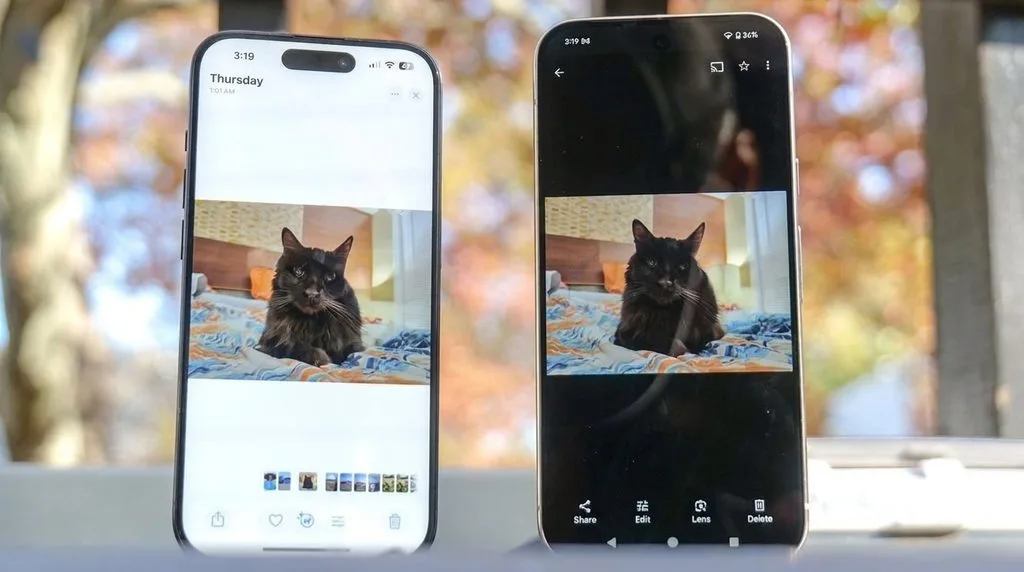
Both services automatically surface your past photos in Memories-style collections. Google places a Memories carousel at the top of your main feed, with stylized photo edits, auto-generated movies, and collage suggestions. Apple does the same in the Photos app’s “For You” tab, with featured photos, curated collections, and Memory Movies set to music.
They’re comparable in quality — Google is slightly more aggressive about surfacing content, Apple more restrained. If you love a daily nostalgia hit, both deliver. If you find it creepy, both let you hide specific people, dates, and memories.
Sharing with friends and family
Google Photos offers shared albums, partner sharing (automatically share photos of specific people with a partner), and conversations inside albums. Link sharing comes with granular permissions — you can toggle whether recipients can comment or see photo locations.
Apple’s Shared Albums support up to 100 subscribers, but image quality and storage rules depend on the software version used to create the album. Albums created in iOS 26 or earlier resize photos to 2048 pixels on the long edge in most cases. Albums created in iOS 27 or later support original formats and full-resolution sharing, with photos and videos counting toward the owner’s iCloud storage.
A fresh 2026 development: with iOS 27, iCloud Shared Albums finally let people without an Apple ID contribute photos via the web. That closes a long-standing gap for sharing with Android-using relatives, though the 2048-pixel resize limit still applies. For cross-platform sharing, Google’s model is still more flexible.
Cross-platform and web access
This is where Google runs away with it. Google Photos has full-featured apps on iOS, Android, and the web, with near-perfect feature parity — edit, search, organize, share, and order prints from any browser. On Windows and Mac, use Google Drive for desktop or just the browser.
iCloud Photos is native and beautiful on iPhone, iPad, and Mac. On Windows, iCloud for Windows syncs photos and integrates with the Windows 11 Photos app, but there’s no full editing app. On Android, there is no native iCloud Photos app at all — access is through iCloud.com in a browser, with manual uploads and no background sync.
And iCloud.com/Photos itself is limited: view, organize, and share selected photos via a link, but no editing and no search on the web. On a borrowed computer needing to find a photo, Google’s web interface will feel like a superpower next to Apple’s.
Privacy and encryption: the myth vs. reality
Let’s bust a common assumption: Apple is not automatically more private by default, and Google is not inherently reckless. The truth is more nuanced.
Google Photos encrypts in transit and at rest, but there is no end-to-end encryption option. Google holds the keys and processes your images on its servers to power AI search, face grouping, and editing. That’s the trade-off for superior search: your photos are analyzed by Google’s machines.
iCloud Photos also encrypts in transit and at rest by default, with Apple holding the keys. But Apple offers Advanced Data Protection (ADP), an opt-in feature that adds end-to-end encryption to iCloud Photos and nine other data categories. With ADP on, even Apple cannot read your photos. It requires two-factor authentication plus a recovery contact or key.
Three caveats before you enable it. First, it’s opt-in — not default, so the privacy advantage only applies if you turn it on. Second, as of mid-2026 ADP is not available in the UK; availability varies by region, so check Apple’s current list. Third, enabling ADP blocks Apple’s own direct transfer-to-Google-Photos tool — you’d need to disable it temporarily to move your library. Read more about Advanced Data Protection and iCloud data security on Apple’s support pages.
The honest summary: Apple offers a stronger privacy ceiling if you opt in and live in a supported country, while Google’s default is more convenient but less private. Most people don’t need E2EE for family photos — but if you do, only Apple offers it.
Printing your photos: only one still does
This is a small but meaningful difference for anyone who likes physical prints. Apple discontinued its Photo Print Products service on September 30, 2018. You can still order prints through third-party Photos Project extensions like Motif or Shutterfly, but Apple itself no longer sells prints, books, or calendars. If you want more control over output, our guide to photo printing software walks through your options.
Google Photos still sells prints directly. Individual prints start at $0.18, photo books from $14.99 (softcover) or $29.99 (hardcover), and canvas from $24.99. If you enjoy turning your digital library into physical objects, Google is the only one of the two that still makes it one-click easy.
Portability: how easy is it to leave?
Neither service traps you. Google offers Google Takeout, which exports your entire library as ZIP files. Apple offers two paths at privacy.apple.com: a ZIP export, or a direct transfer of a copy of your iCloud Photos to Google Photos, which takes 3–7 days. Remember that if you have Advanced Data Protection enabled, you must turn it off before the direct transfer will work. If you’re weighing broader backup options, compare the wider field of photo backup — and this independent take on cloud storage for photos covers alternatives neither company will mention. The best cloud storage for photos often includes services with stronger E2EE defaults than either.
Verdict: which should you choose, by user type
iPhone-only user
Go with iCloud Photos. It’s built in, stores full-resolution originals, integrates with every Apple app, and offers end-to-end encryption via Advanced Data Protection. Expect to pay $2.99–$9.99/month. Just know that AI features like Clean Up require recent Pro hardware.
Android or mixed-platform user
Go with Google Photos. It’s the default on Android, works flawlessly on iOS too, and its search and AI editing lead. The 15 GB free tier and $1.99 100 GB entry point are easy on the wallet, and the “free up space” model is ideal for phones with limited storage.
Cross-platform household
Google Photos is the safer default. Everyone — iPhone, Android, Windows, web — gets the same full experience. Apple’s Shared Albums now accept web contributions, but the 2048-pixel resize and lack of an Android app still make it second-class for mixed families.
Professional or RAW shooter
Both store RAW originals, but iCloud Photos has no per-file compression and no 200 MB upload cap, and its 12 TB tier ($59.99) undercuts Google’s AI Ultra on pure storage. Neither replaces a proper DAM workflow, though — use one as a backup, not your primary archive.
Family sharing
Both let you share storage with up to five others. iCloud+ is slightly simpler for all-Apple families, but a Shared Photo Library counts entirely against the organizer’s quota. Google One family sharing is equally generous and works regardless of what phone each member carries.
Budget shopper
Apple’s 50 GB for $0.99 is the cheapest entry, but it’s tiny. For most people the sweet spot is 200 GB at $2.99 — identical on both. If you’ll use Gemini anyway, Google’s 2 TB AI Plus at $9.99 bundles real value. If you only want storage, Apple’s linear pricing to 12 TB wins above 2 TB.
Frequently Asked Questions
Does Google Photos still offer free unlimited storage?
No. Unlimited free storage ended on June 1, 2021. All uploads now count against your 15 GB free Google storage or a paid Google One plan. Original 2016 Pixel owners are grandfathered for unlimited original-quality uploads, and Pixel 2–5 owners get unlimited compressed (Storage saver) uploads.
Is iCloud+ the same as iCloud Photos?
No. iCloud is Apple’s cloud service, iCloud Photos is the photo-syncing feature within it, and iCloud+ is the paid subscription that upgrades your storage and adds perks like Private Relay and Hide My Email.
Can I use both Google Photos and iCloud Photos on my iPhone?
Yes. You can run both simultaneously for redundant backup. The downsides are doubled data and battery usage during uploads, and you’ll need to manage two libraries. Many people use iCloud as their primary library and Google Photos as a secondary backup.
Does deleting a photo from my iPhone delete it from Google Photos?
No. Google Photos treats the cloud as a destination — once a photo is backed up, deleting it from your phone (or using “Free up space”) doesn’t remove the cloud copy. With iCloud Photos, deleting from your phone deletes it everywhere, because iCloud is a mirror.
Is Apple’s Advanced Data Protection on by default?
No. It’s opt-in. You need two-factor authentication and a recovery contact or recovery key to enable it. It’s not available in all regions (including the UK as of mid-2026), and it blocks Apple’s direct transfer-to-Google-Photos tool while enabled.
How many Magic Editor edits do I get for free?
Free users get roughly 10 saved Magic Editor edits per month. Pixel 8 and newer phones get unlimited. Other devices need an eligible Google AI plan for unlimited saves — Google has shifted these limits, so verify the current threshold in the app.
Do shared albums count against my storage?
On Google Photos, shared albums count against the owner’s quota. On Apple, Shared Albums don’t count against your iCloud storage, but a Shared Photo Library (the collaborative one) counts entirely against the organizer’s quota.